> ## Documentation Index
> Fetch the complete documentation index at: https://parser.xdr.ooo/llms.txt
> Use this file to discover all available pages before exploring further.
# Choose what to do next
> Use the analysis result—not your knowledge of a log format—to pick the next step.
# What did Parser Studio say after Analyze Logs?
**Always begin with the same action:** Auto Parser → paste a few logs → **Analyze Logs**.
| What you see on screen | What to do next | Click-by-click guide |
| - | - | - |
| **N of N log events parsed completely** | Click **Review Fields**, check values, then **Map Fields** and **Create Parser** | [Normal path](/quickstart) |
| **Some events need attention** | Select **Problem to review**, inspect **Original event** and **What needs attention**, then use the **Recommended fix** | [Fix a flagged event](/scenarios/partial-event) |
| **No complete, trustworthy result** | Use **Fix with ChatGPT** or the left-side **ChatGPT Assisted Parser** path | [Ask ChatGPT safely](/workflows/chatgpt-assisted) |
| **Values found but no column names** | Click **Keep all values with temporary names**, or enter names from the log definition and confirm them | [Unnamed columns](/scenarios/unnamed-values) |
| **Different log shapes** | Account for all events, review the supported mixed result or analyze groups separately | [Several log types](/scenarios/mixed-events) |
| **All fields correct but wrong output name** | In **Map Fields**, change only the incorrect destination or type | [Fix a field name](/scenarios/normalization) |
## One decision tree
```text theme={null}
Copy logs → Auto Parser → Analyze Logs
|
+--------------+---------------+
| | |
Complete Partial Unrecognized
| | |
Review Fields Problem to ChatGPT Assisted
| review Parser
Map Fields | |
| Apply a safe Redact → Prompt
Create Parser fix or ask → Review result
| ChatGPT |
Final test + +------ Re-analyze / validate
download
```
A parser is not ready just because it recognized the general log structure. Check the **original value**, **output mapping**, and **every event in the sample** before file generation.
## Where do I find optional tools?
Use **Tools & Diagnostics** (top toolbar) only when the normal analysis asks you to investigate an unusual boundary, repeated text pattern or an existing parser. It is not required for the ordinary four-stage path.
## Examples by situation
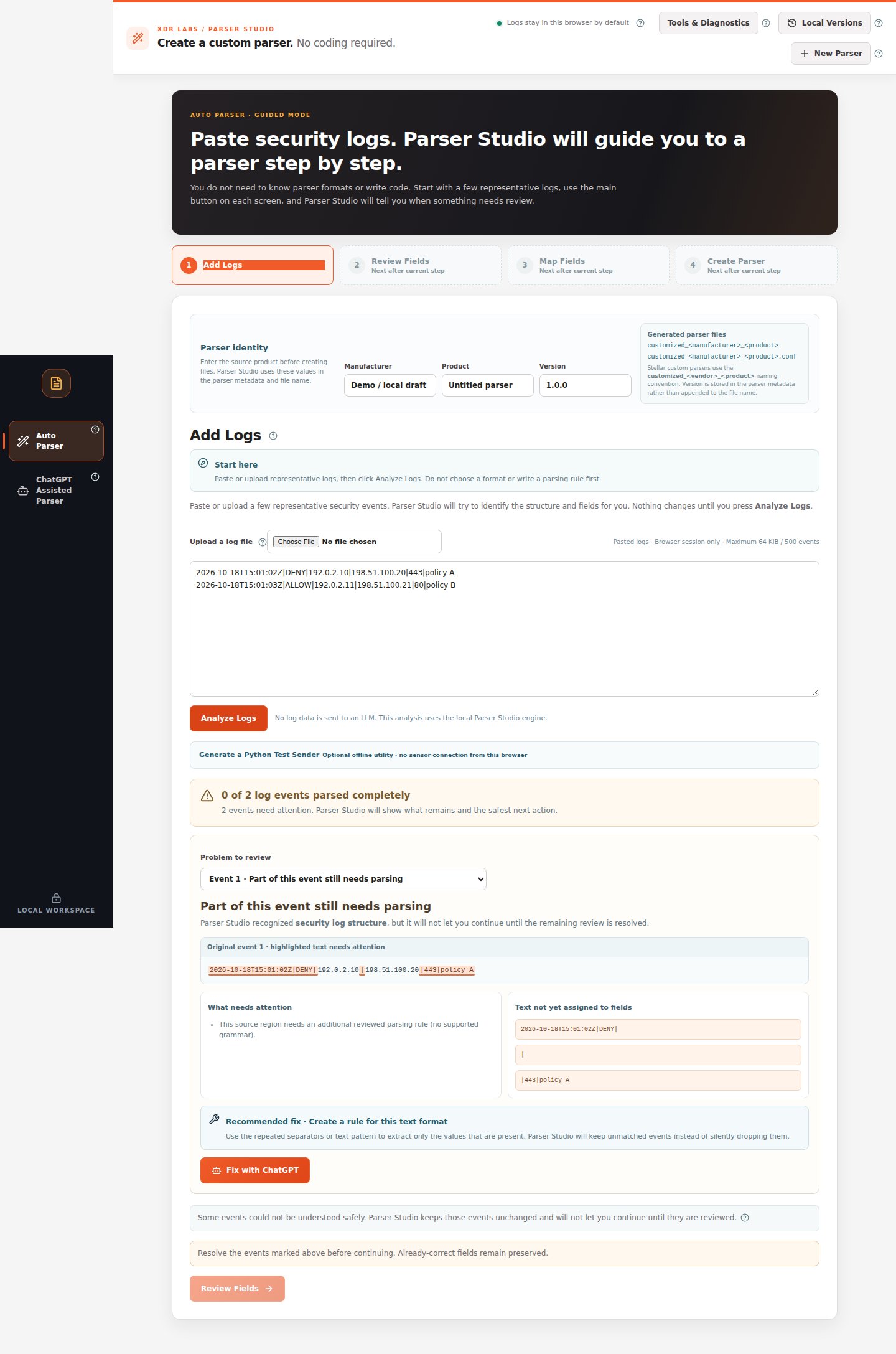 *A blocked result keeps Review Fields unavailable until you resolve the flagged event.*
* [I pasted logs and everything was detected](/quickstart)
* [I pasted logs and part of a message was missed](/scenarios/unknown-log)
* [I have many kinds of events from one product](/scenarios/mixed-events)
* [I need ChatGPT to suggest how to read my logs](/scenarios/recipe-ai)
This documentation is built and hosted on [Mintlify](https://mintlify.com), a developer documentation platform.
*A blocked result keeps Review Fields unavailable until you resolve the flagged event.*
* [I pasted logs and everything was detected](/quickstart)
* [I pasted logs and part of a message was missed](/scenarios/unknown-log)
* [I have many kinds of events from one product](/scenarios/mixed-events)
* [I need ChatGPT to suggest how to read my logs](/scenarios/recipe-ai)
This documentation is built and hosted on [Mintlify](https://mintlify.com), a developer documentation platform.