> ## Documentation Index
> Fetch the complete documentation index at: https://parser.xdr.ooo/llms.txt
> Use this file to discover all available pages before exploring further.
# Something went wrong—what should I click?
> Find the actual Parser Studio error text and the immediate next action.
# Something went wrong. What should I click?
**Do not start by changing a parsing expression or choosing a format.** Stay in **Auto Parser** and use the actual warning the application displays.
## Common issues after Analyze Logs
| What the UI says or shows | What to click or check |
| - | - |
| **N of N events parsed completely** | This is not an error. Click **Review Fields**, then **Map Fields** and **Create Parser** |
| **Events need attention** | Select **Problem to review**, inspect **Original event** and **What needs attention**, then read **Recommended fix** |
| **Part of this event still needs parsing** | Keep the correctly extracted fields; use **Fix with ChatGPT** only for the unresolved section |
| **This event could not be safely structured yet** | Check that you pasted full events; open **ChatGPT Assisted Parser** if you cannot identify the source |
| **Values found, but this log does not include field names** | Click **Keep all N values with temporary names**, or enter verified names under **Names to give each value** |
| **Different log shapes were found** | Try **Analyze group 1** for separate groups, or review supported combined structures |
| **Local parser analysis is unavailable** | Preserve the source and check local analysis service availability; do not mistake a browser preview for complete analysis |
| **Some events cannot be understood safely** | Resolve every flagged record before attempting the next stage |
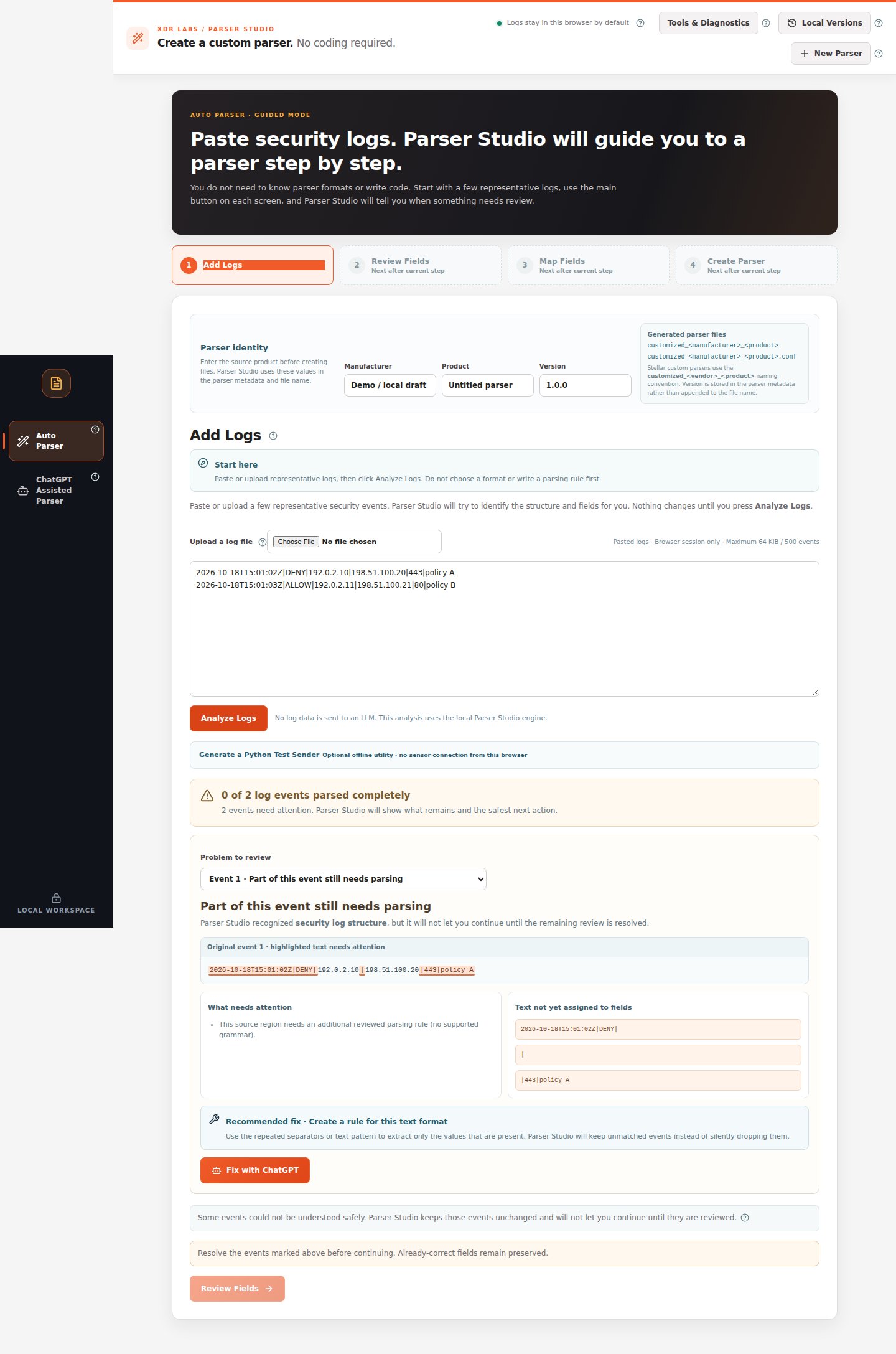 *When the event is incomplete, Parser Studio shows the exact source region and an action. The next-stage button remains blocked.*
## Problems in Map Fields
| Warning | What to do |
| - | - |
| **Two fields use the same destination** | Give fields different valid destinations unless they truly represent the same supported value |
| **Value does not fit the selected type** | Use **Value type** to choose a type compatible with actual source values |
| **Source field missing** | Compare several event types; determine whether the field is optional or misspelled |
| **Unverified or system-managed destination** | Select a verified catalog field or keep a custom/vendor destination |
If the source value itself was correct, **do not re-parse the logs** to fix the mapping name.
## Problems during Create Parser
| What happened | What to do |
| - | - |
| **Need fixing** is nonzero | Return to **Map Fields** or the flagged **Review Fields** event |
| **Run Final Test & Create Files** does not succeed | Read the specific error; check complete source, supported operations and local generator availability |
| **Checksum or returned file mismatch** | Do not use the suspect output; regenerate from the validated source after the service is healthy |
| **No file download appears** | Confirm the final generation actually succeeded. Analyze Logs alone does not produce output files |
## ChatGPT did not solve it
1. Verify that the copied prompt was masked and described only the missing field.
2. Ask for **ParserRecipe v0.2 JSON**, not arbitrary executable code.
3. Paste under **3. Paste the ChatGPT result**, then **Check ChatGPT Result**.
4. If a changed rule fails the additional-sample comparison, **do not approve it**.
## How to report a reproducible issue
Keep a **fictional or masked** example, note which stage failed, copy the exact on-screen message, list the number of affected events and describe the expected field/value. Never attach private original logs to a public issue.
Correctly found fields stay preserved while you repair the remainder.
Use the supported manual ChatGPT workflow.
This documentation is built and hosted on [Mintlify](https://mintlify.com), a developer documentation platform.
*When the event is incomplete, Parser Studio shows the exact source region and an action. The next-stage button remains blocked.*
## Problems in Map Fields
| Warning | What to do |
| - | - |
| **Two fields use the same destination** | Give fields different valid destinations unless they truly represent the same supported value |
| **Value does not fit the selected type** | Use **Value type** to choose a type compatible with actual source values |
| **Source field missing** | Compare several event types; determine whether the field is optional or misspelled |
| **Unverified or system-managed destination** | Select a verified catalog field or keep a custom/vendor destination |
If the source value itself was correct, **do not re-parse the logs** to fix the mapping name.
## Problems during Create Parser
| What happened | What to do |
| - | - |
| **Need fixing** is nonzero | Return to **Map Fields** or the flagged **Review Fields** event |
| **Run Final Test & Create Files** does not succeed | Read the specific error; check complete source, supported operations and local generator availability |
| **Checksum or returned file mismatch** | Do not use the suspect output; regenerate from the validated source after the service is healthy |
| **No file download appears** | Confirm the final generation actually succeeded. Analyze Logs alone does not produce output files |
## ChatGPT did not solve it
1. Verify that the copied prompt was masked and described only the missing field.
2. Ask for **ParserRecipe v0.2 JSON**, not arbitrary executable code.
3. Paste under **3. Paste the ChatGPT result**, then **Check ChatGPT Result**.
4. If a changed rule fails the additional-sample comparison, **do not approve it**.
## How to report a reproducible issue
Keep a **fictional or masked** example, note which stage failed, copy the exact on-screen message, list the number of affected events and describe the expected field/value. Never attach private original logs to a public issue.
Correctly found fields stay preserved while you repair the remainder.
Use the supported manual ChatGPT workflow.
This documentation is built and hosted on [Mintlify](https://mintlify.com), a developer documentation platform.