> ## Documentation Index
> Fetch the complete documentation index at: https://parser.xdr.ooo/llms.txt
> Use this file to discover all available pages before exploring further.
# One log is only partly parsed | Fix the highlighted section
> What to click when some fields are correct but one portion of an event is not understood.
# Some fields are correct, but part of my log is missing
**Situation:** You pasted several logs, clicked **Analyze Logs**, and the result says some events need attention. A few fields look right, but the application has highlighted a particular region.
## Example you can try
```text theme={null}
action=allow src=192.0.2.10 reason="policy denied
action=deny src=198.51.100.20 reason=blocked
```
The first record has an unclosed quotation mark. Parser Studio must not pretend that its remaining text is parsed correctly.
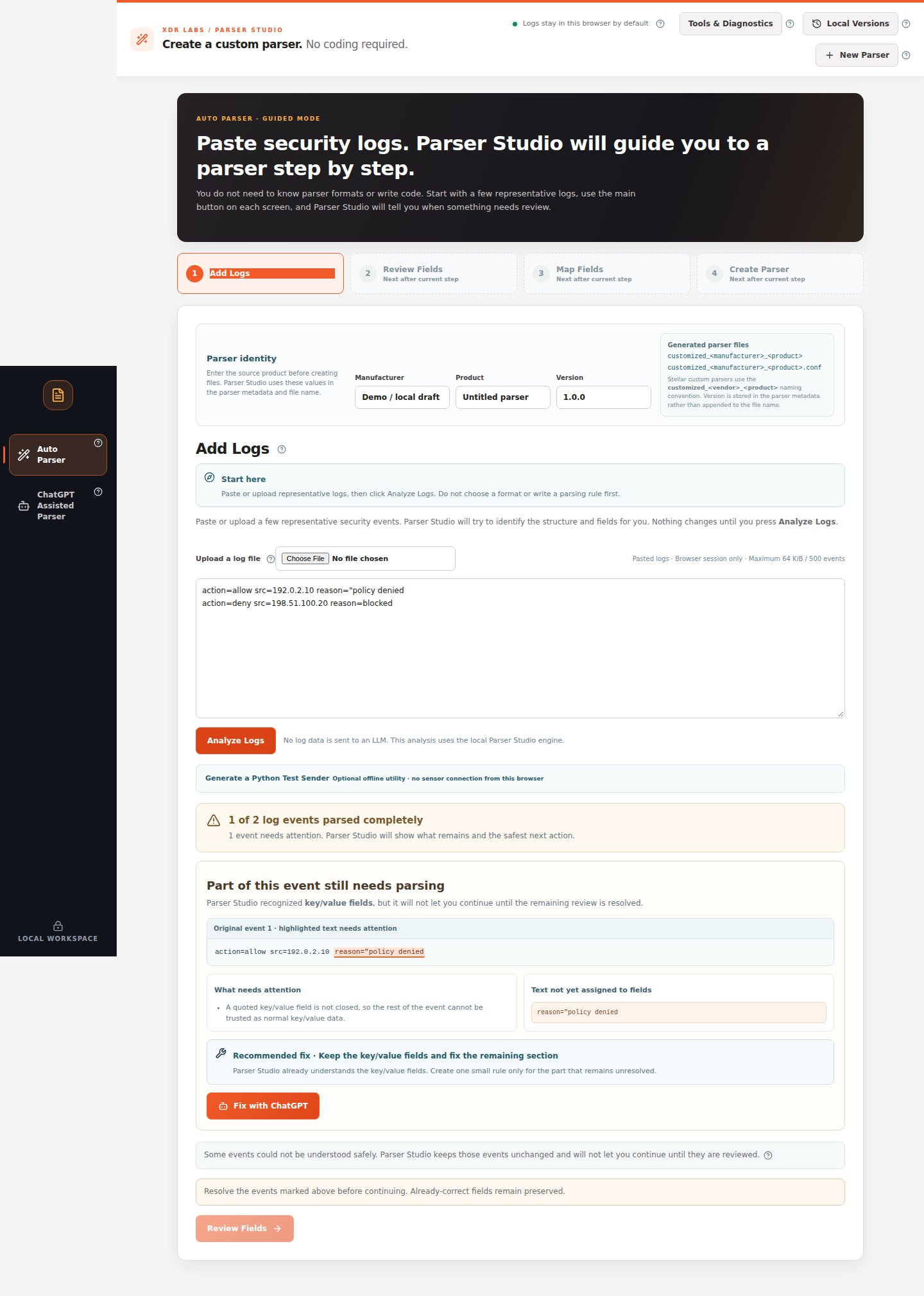 *One event needs attention. The warning identifies the exact original text that cannot be trusted yet.*
## Walkthrough
1. Stay in **Auto Parser → Add Logs** after clicking **Analyze Logs**.
2. If multiple events are flagged, choose one from **Problem to review**.
3. Read **What needs attention**. Then look at **Original event** to see the highlighted fragment.
4. Read **Recommended fix**. If the problem is an incomplete source copy, obtain the complete original event and paste it again.
5. If the source is complete but needs an additional supported rule, click **Fix with ChatGPT**. A reviewable prompt appears—**inspect and mask the original text** before copying it outside the browser.
6. Return a supported structured result, test it against additional source events, and apply only a change that passes.
7. Click **Analyze Logs** again if the source has changed. Proceed to **Review Fields** only when no blocking events remain.
## Expected review outcome
The result should identify each event as completely parsed or as a reviewed, supported candidate. Previously correct fields must remain unchanged. Once the **Review Fields** button becomes available, continue through [mapping and file creation](/quickstart).
## Recovery path
Use the left navigation **ChatGPT Assisted Parser**, starting with the same local logs and a separate masked example. Follow [the full assistant workflow](/workflows/chatgpt-assisted).
Do not remove a warning by deleting the problematic row. Keeping all important event types is more useful than creating a parser that quietly ignores some of them.
This documentation is built and hosted on [Mintlify](https://mintlify.com), a developer documentation platform.
*One event needs attention. The warning identifies the exact original text that cannot be trusted yet.*
## Walkthrough
1. Stay in **Auto Parser → Add Logs** after clicking **Analyze Logs**.
2. If multiple events are flagged, choose one from **Problem to review**.
3. Read **What needs attention**. Then look at **Original event** to see the highlighted fragment.
4. Read **Recommended fix**. If the problem is an incomplete source copy, obtain the complete original event and paste it again.
5. If the source is complete but needs an additional supported rule, click **Fix with ChatGPT**. A reviewable prompt appears—**inspect and mask the original text** before copying it outside the browser.
6. Return a supported structured result, test it against additional source events, and apply only a change that passes.
7. Click **Analyze Logs** again if the source has changed. Proceed to **Review Fields** only when no blocking events remain.
## Expected review outcome
The result should identify each event as completely parsed or as a reviewed, supported candidate. Previously correct fields must remain unchanged. Once the **Review Fields** button becomes available, continue through [mapping and file creation](/quickstart).
## Recovery path
Use the left navigation **ChatGPT Assisted Parser**, starting with the same local logs and a separate masked example. Follow [the full assistant workflow](/workflows/chatgpt-assisted).
Do not remove a warning by deleting the problematic row. Keeping all important event types is more useful than creating a parser that quietly ignores some of them.
This documentation is built and hosted on [Mintlify](https://mintlify.com), a developer documentation platform.