> ## Documentation Index
> Fetch the complete documentation index at: https://parser.xdr.ooo/llms.txt
> Use this file to discover all available pages before exploring further.
# Parser Studio does not understand my log
> Start in Auto Parser, inspect the warning, then follow the full ChatGPT Assisted menu.
# Parser Studio cannot understand this log. What do I do?
**Situation:** You pasted logs, clicked **Analyze Logs**, and the result says **0 of N log events parsed completely**, or the entire text is marked as needing review. You do not need to identify a log format before starting the recovery workflow.
## Practice sample
```text theme={null}
2026-10-18T15:01:02Z|DENY|192.0.2.10|198.51.100.20|443|policy A
2026-10-18T15:01:03Z|ALLOW|192.0.2.11|198.51.100.21|80|policy B
```
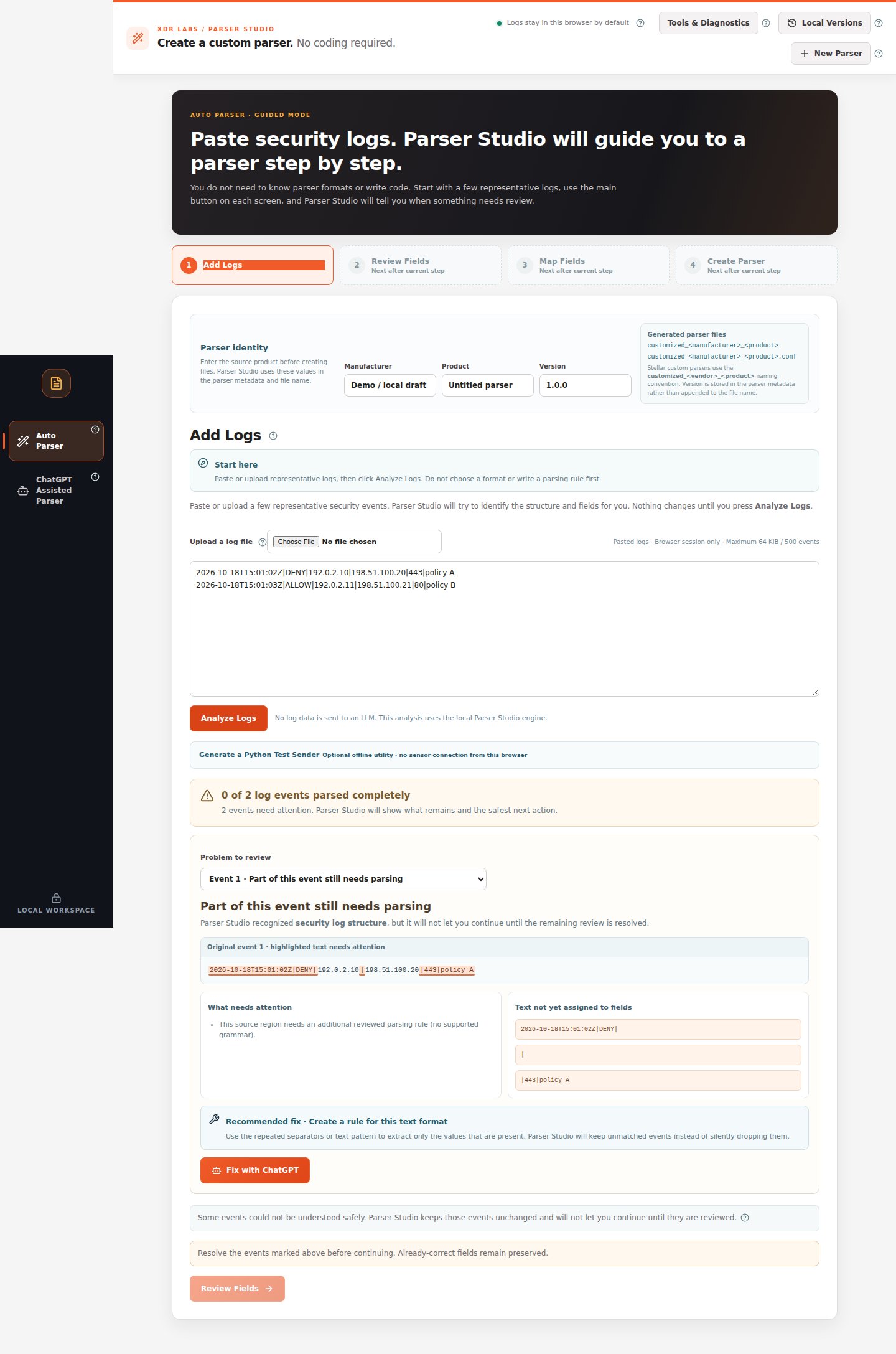 *The unresolved text is visible. The Review Fields button is not yet available.*
## Walkthrough
1. Stay under **Auto Parser → Add Logs**. Confirm you pasted complete source records, then click **Analyze Logs**.
2. Read the result. If it needs attention, use **Problem to review** to select an event.
3. Check **Original event**, **What needs attention**, and **Recommended fix**.
4. If a supported on-screen fix such as **Use extracted fields** is offered, review it first. If no safe local repair is available, click **Fix with ChatGPT** or select **ChatGPT Assisted Parser** on the left.
5. In **Original local logs**, keep the source for local checking. Describe the fields you need in **What do you want Parser Studio to find?**.
6. Review and mask the separate **Redacted example to copy to ChatGPT**.
7. Click **Prepare ChatGPT Prompt** → **Copy Prompt**, then paste that prompt into ChatGPT yourself.
8. Ask for **supported ParserRecipe v0.2 JSON**, return the response to **3. Paste the ChatGPT result**, then click **Check ChatGPT Result**.
9. If Parser Studio requests additional test logs, provide different examples, check the comparison and approve only a passing supported change.
10. Return to Auto Parser and re-review all records before mapping and generation.
*The unresolved text is visible. The Review Fields button is not yet available.*
## Walkthrough
1. Stay under **Auto Parser → Add Logs**. Confirm you pasted complete source records, then click **Analyze Logs**.
2. Read the result. If it needs attention, use **Problem to review** to select an event.
3. Check **Original event**, **What needs attention**, and **Recommended fix**.
4. If a supported on-screen fix such as **Use extracted fields** is offered, review it first. If no safe local repair is available, click **Fix with ChatGPT** or select **ChatGPT Assisted Parser** on the left.
5. In **Original local logs**, keep the source for local checking. Describe the fields you need in **What do you want Parser Studio to find?**.
6. Review and mask the separate **Redacted example to copy to ChatGPT**.
7. Click **Prepare ChatGPT Prompt** → **Copy Prompt**, then paste that prompt into ChatGPT yourself.
8. Ask for **supported ParserRecipe v0.2 JSON**, return the response to **3. Paste the ChatGPT result**, then click **Check ChatGPT Result**.
9. If Parser Studio requests additional test logs, provide different examples, check the comparison and approve only a passing supported change.
10. Return to Auto Parser and re-review all records before mapping and generation.
 *Use this menu when automatic analysis cannot safely understand the source. Nothing is automatically sent to ChatGPT.*
## Expected review outcome
You either obtain a supported, independently reviewed proposal or retain a clear unsupported status. Neither result silently discards the original logs.
## Recovery path
If the ChatGPT response contains arbitrary executable code, invalid schema or an unsupported transformation, request a narrower supported structured proposal. If no supported solution is available, preserve the samples and do not claim a parser was created.
**Next:** [Full ChatGPT Assisted walkthrough](/workflows/chatgpt-assisted).
This documentation is built and hosted on [Mintlify](https://mintlify.com), a developer documentation platform.
*Use this menu when automatic analysis cannot safely understand the source. Nothing is automatically sent to ChatGPT.*
## Expected review outcome
You either obtain a supported, independently reviewed proposal or retain a clear unsupported status. Neither result silently discards the original logs.
## Recovery path
If the ChatGPT response contains arbitrary executable code, invalid schema or an unsupported transformation, request a narrower supported structured proposal. If no supported solution is available, preserve the samples and do not claim a parser was created.
**Next:** [Full ChatGPT Assisted walkthrough](/workflows/chatgpt-assisted).
This documentation is built and hosted on [Mintlify](https://mintlify.com), a developer documentation platform.