> ## Documentation Index
> Fetch the complete documentation index at: https://parser.xdr.ooo/llms.txt
> Use this file to discover all available pages before exploring further.
# Review Fields | Are the values correct?
> Compare source and extracted event values, then continue or repair the exact problem.
# Review Fields: check the values, not the format
**You reached this screen because the logs have been analyzed.** The question now is simple: “Did Parser Studio find the values I expect?”
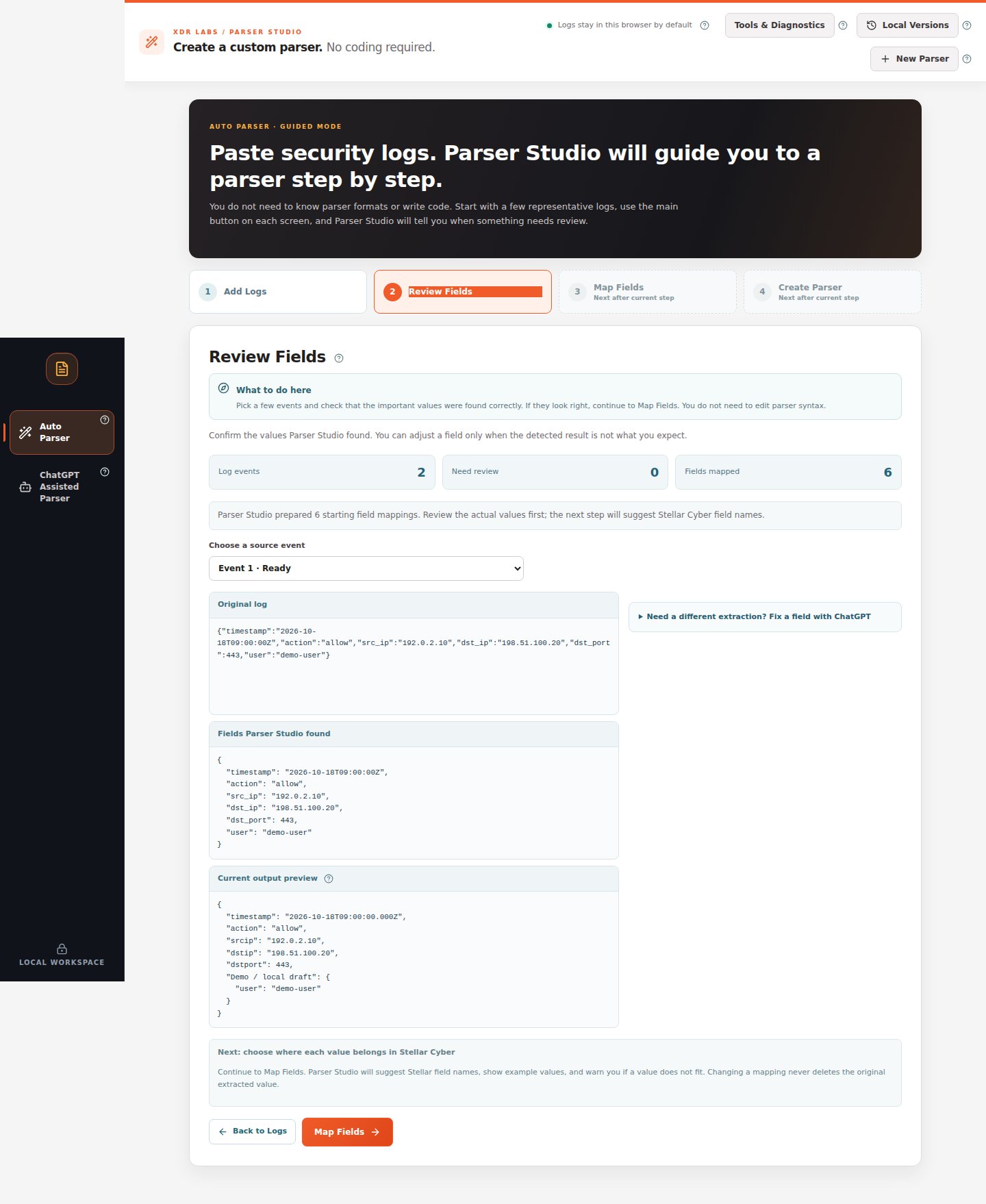 *Check the original and extracted values for at least two events.*
## If everything looks correct
1. In **Choose a source event**, select **Event 1**.
2. Read **Original log**, **Fields Parser Studio found**, and **Current output preview**.
3. Look for action, timestamp, addresses, username, port and any important security event value.
4. Switch to another event and confirm its different values were also detected.
5. Click **Map Fields** at the bottom. **Do not open repair tools for a correct field.**
## If a field is wrong or missing
For example, an original record includes `reason="policy denied"`, but the result shows only `policy`.
1. Confirm which original event has the wrong value.
2. If you are still at **Add Logs** with a warning, use **Problem to review** to select the failing event. The underlined or highlighted section identifies the unresolved bytes.
3. Read **What needs attention** and **Recommended fix**.
4. If the whole source structure is already recognized but only one field is missing, preserve the fields that are correct and apply only a reviewed fix.
5. In **Review Fields**, the optional disclosure **Need a different extraction? Fix a field with ChatGPT** lets you investigate a selected event.
6. Test the change against additional events before accepting it.
*Check the original and extracted values for at least two events.*
## If everything looks correct
1. In **Choose a source event**, select **Event 1**.
2. Read **Original log**, **Fields Parser Studio found**, and **Current output preview**.
3. Look for action, timestamp, addresses, username, port and any important security event value.
4. Switch to another event and confirm its different values were also detected.
5. Click **Map Fields** at the bottom. **Do not open repair tools for a correct field.**
## If a field is wrong or missing
For example, an original record includes `reason="policy denied"`, but the result shows only `policy`.
1. Confirm which original event has the wrong value.
2. If you are still at **Add Logs** with a warning, use **Problem to review** to select the failing event. The underlined or highlighted section identifies the unresolved bytes.
3. Read **What needs attention** and **Recommended fix**.
4. If the whole source structure is already recognized but only one field is missing, preserve the fields that are correct and apply only a reviewed fix.
5. In **Review Fields**, the optional disclosure **Need a different extraction? Fix a field with ChatGPT** lets you investigate a selected event.
6. Test the change against additional events before accepting it.
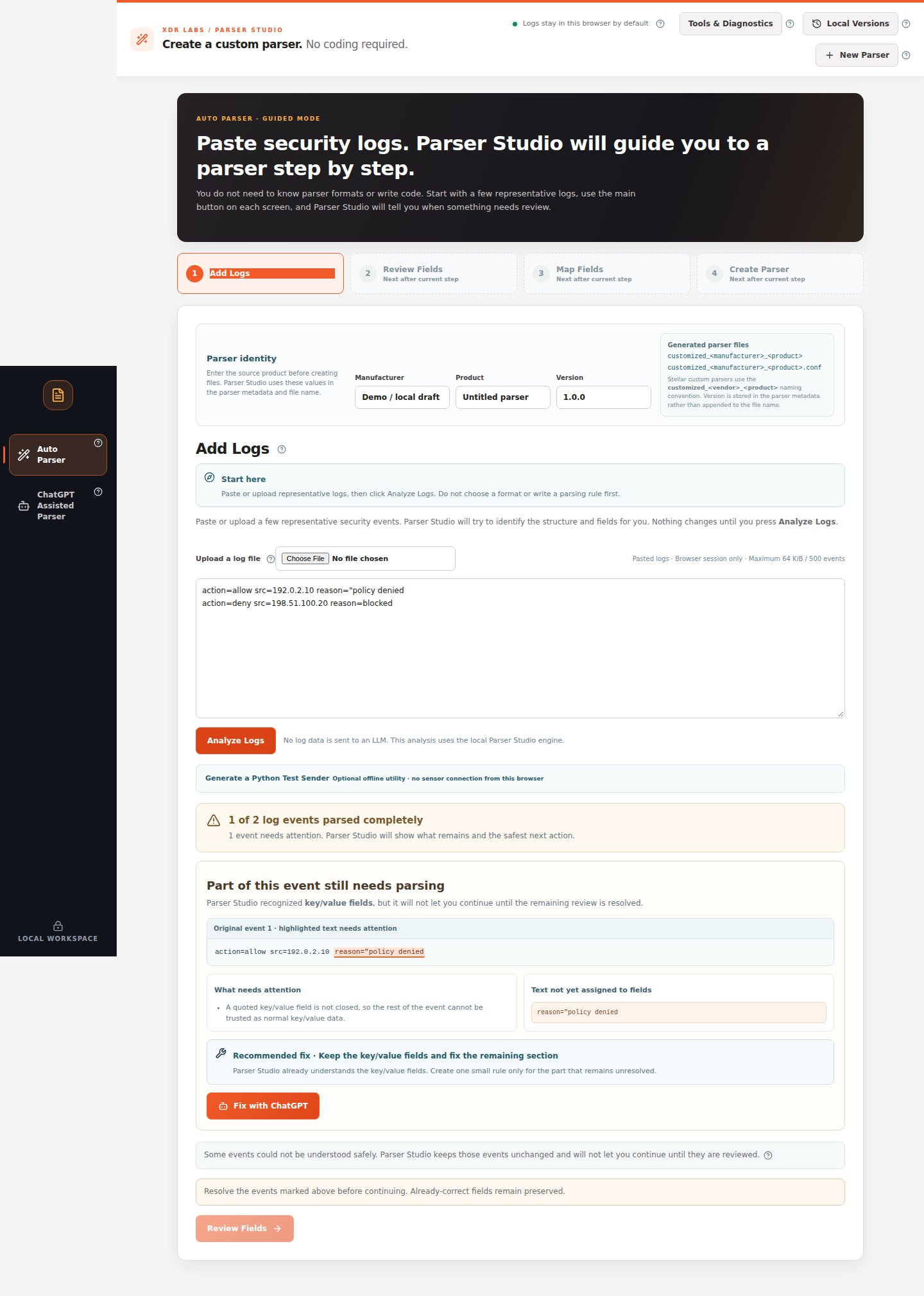 *The original event remains visible. The incorrect portion is highlighted rather than silently omitted.*
## Typical problems
| What you notice | First action |
| - | - |
| A string with spaces was split | Inspect its quotation marks and escaping; see [partial event](/scenarios/partial-event) |
| A source field is present, but you cannot identify it | See [unrecognized logs](/scenarios/unknown-log) |
| CSV values are extracted without reliable column names | [Keep temporary names or use a specification](/scenarios/unnamed-values) |
| The extraction is correct, but the output field is wrong | Continue to [Map Fields](/workflows/map-fields); do not rewrite parsing logic |
| Different events behave differently | [Review multiple event shapes](/scenarios/mixed-events) |
“A value is visible” is not the same as “the value has been extracted correctly.” Compare it with the exact original event before proceeding.
**Next:** [Map Fields](/workflows/map-fields).
This documentation is built and hosted on [Mintlify](https://mintlify.com), a developer documentation platform.
*The original event remains visible. The incorrect portion is highlighted rather than silently omitted.*
## Typical problems
| What you notice | First action |
| - | - |
| A string with spaces was split | Inspect its quotation marks and escaping; see [partial event](/scenarios/partial-event) |
| A source field is present, but you cannot identify it | See [unrecognized logs](/scenarios/unknown-log) |
| CSV values are extracted without reliable column names | [Keep temporary names or use a specification](/scenarios/unnamed-values) |
| The extraction is correct, but the output field is wrong | Continue to [Map Fields](/workflows/map-fields); do not rewrite parsing logic |
| Different events behave differently | [Review multiple event shapes](/scenarios/mixed-events) |
“A value is visible” is not the same as “the value has been extracted correctly.” Compare it with the exact original event before proceeding.
**Next:** [Map Fields](/workflows/map-fields).
This documentation is built and hosted on [Mintlify](https://mintlify.com), a developer documentation platform.