> ## Documentation Index
> Fetch the complete documentation index at: https://parser.xdr.ooo/llms.txt
> Use this file to discover all available pages before exploring further.

# Parser Studio | Start with your logs

> You do not need to know the log format. Copy, analyze, review, and create.

<div className="xdr-hero">
  <p className="xdr-kicker">XDR Labs / Parser Studio</p>
  <h1 className="xdr-hero-title">Paste a log. We’ll guide you from there.</h1>

  <p className="xdr-hero-copy">
    You do not need to know whether a log is CEF, LEEF, JSON, or something else. Copy a few events into Parser Studio, click Analyze Logs, and follow the results to your parser files.
  </p>

  <div className="xdr-hero-actions">
    <a className="xdr-hero-primary" href="/quickstart">Create my first parser →</a>
    <a className="xdr-hero-secondary" href="/choose-workflow">What if my logs need help?</a>
  </div>

  <div className="xdr-signal-grid">
    <div className="xdr-signal"><strong>1. Paste</strong><span>Copy a few complete events from your product.</span></div>
    <div className="xdr-signal"><strong>2. Analyze</strong><span>Find out which events and fields were recognized.</span></div>
    <div className="xdr-signal"><strong>3. Create</strong><span>Review names, check the sample and download validated draft files.</span></div>
  </div>
</div>

## What should I do after Analyze Logs?

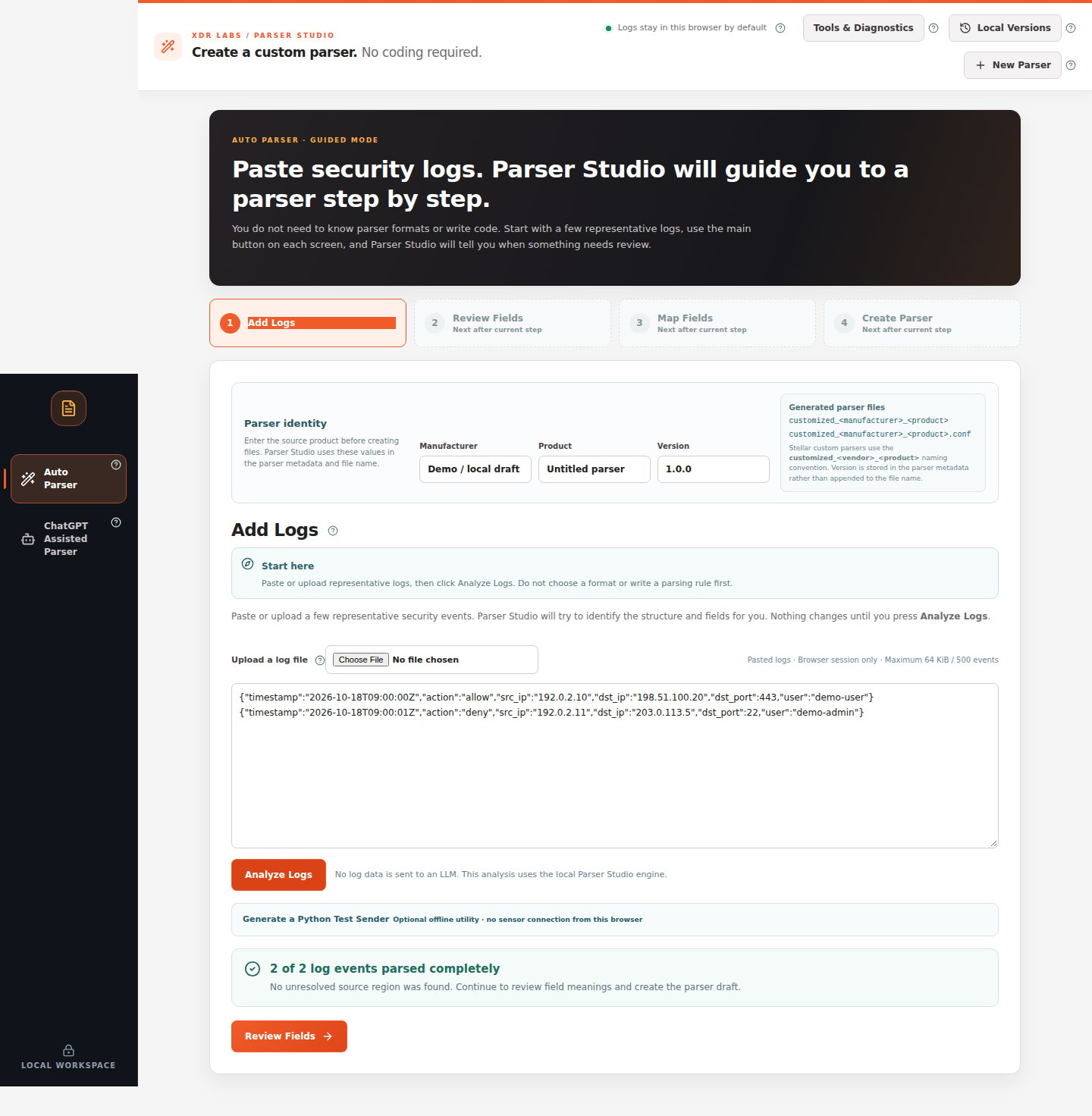
You start the **same way in every case**: open **Auto Parser**, paste logs, and press **Analyze Logs**. The next step depends on what the result says.

<CardGroup cols={2}>
  <Card title="Everything was parsed" icon="circle-check" href="/quickstart">
    Continue to Review Fields → Map Fields → Create Parser. You do not need to change formats or write rules.
  </Card>

  <Card title="Some text needs attention" icon="triangle-exclamation" href="/scenarios/partial-event">
    Select the flagged event, inspect the highlighted section, and use the recommended fix.
  </Card>

  <Card title="Parser Studio does not understand my logs" icon="comments" href="/workflows/chatgpt-assisted">
    Use ChatGPT Assisted Parser, prepare a masked example, and review the suggested solution.
  </Card>

  <Card title="My product has several log types" icon="layer-group" href="/scenarios/mixed-events">
    Paste representative examples of all types, review the event counts, and choose a combined or separate draft according to the supported result.
  </Card>
</CardGroup>

## The normal path

<div className="ps-flow"><span>Add Logs</span><b>→</b><span>Analyze Logs</span><b>→</b><span>Review Fields</span><b>→</b><span>Map Fields</span><b>→</b><span>Create Parser</span></div>

<img src="https://mintcdn.com/xdr-parser/DkeLTskQMJz9hCfD/images/02-analyzed-sample.png?fit=max&auto=format&n=DkeLTskQMJz9hCfD&q=85&s=86e40ed7425615a52fd1089ac49560e2" alt="Auto Parser showing two of two security log events parsed completely and the Review Fields button" width="1440" height="1472" data-path="images/02-analyzed-sample.png" />

*Actual Parser Studio screen using fictional logs. With 2 of 2 events parsed completely, the user can click Review Fields.*

## Pick an example that matches your situation

<CardGroup cols={2}>
  <Card title="My first five minutes" icon="rocket" href="/quickstart">Follow every click from pasted logs to the final file-creation screen.</Card>
  <Card title="A red or yellow warning appears" icon="wrench" href="/scenarios/unknown-log">Find the exact unparsed text and the next action.</Card>
  <Card title="My CSV data has no field names" icon="table" href="/scenarios/unnamed-values">Preserve all columns and confirm their names.</Card>
  <Card title="Multiple event shapes" icon="layers" href="/scenarios/mixed-events">Review whether one combined parser is supported.</Card>
</CardGroup>

<Note>
  The examples use fictional logs, and the screenshots show the actual product UI. A complete sample review supports a draft for those records, not a guarantee for all unseen messages.
</Note>


This documentation is built and hosted on [Mintlify](https://mintlify.com), a developer documentation platform.