Parser Studio cannot understand this log. What do I do?
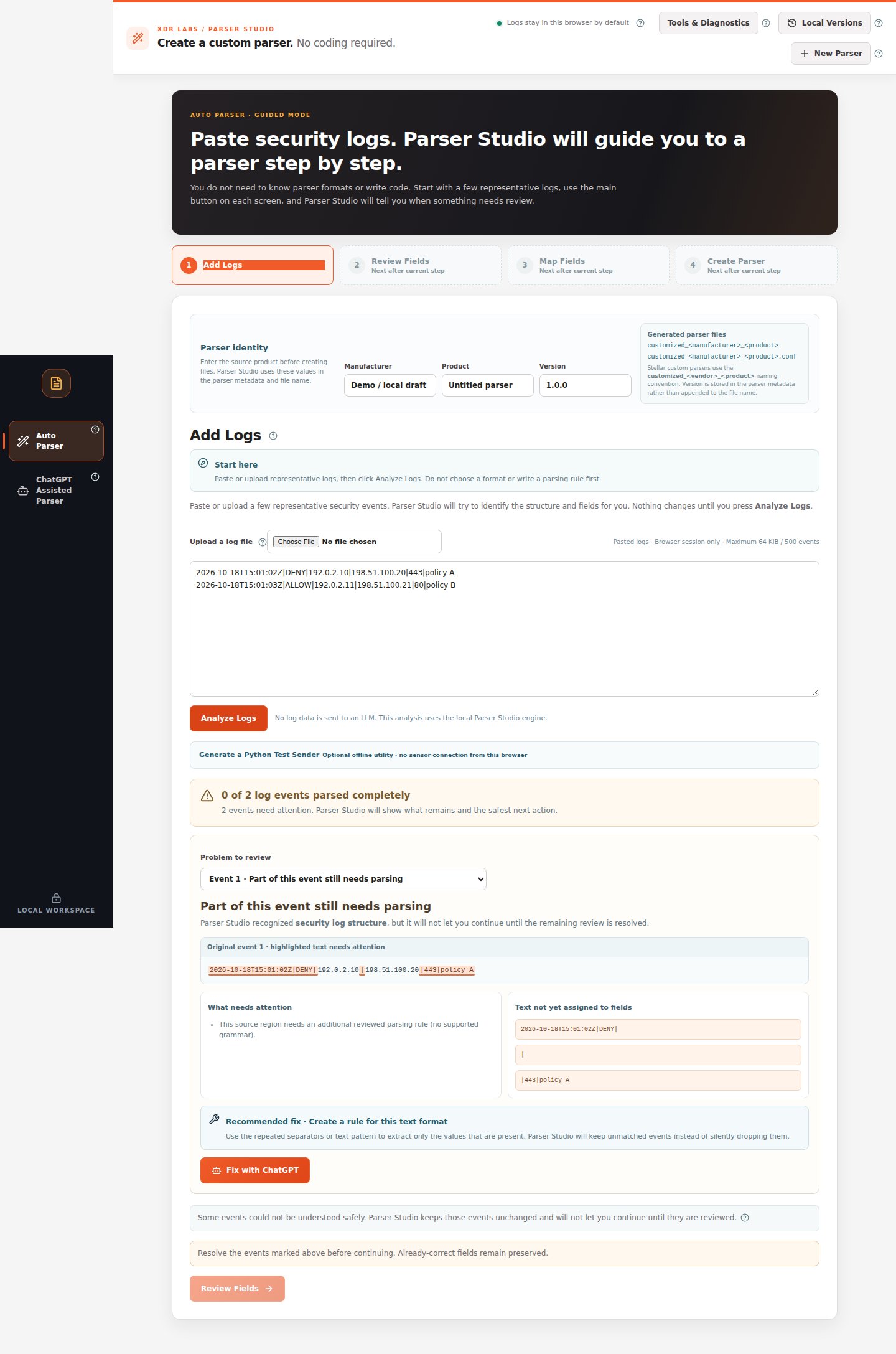
Situation: You pasted logs, clicked Analyze Logs, and the result says 0 of N log events parsed completely, or the entire text is marked as needing review. You do not need to identify a log format before starting the recovery workflow.
Stay under Auto Parser → Add Logs. Confirm you pasted complete source records, then click Analyze Logs.
Read the result. If it needs attention, use Problem to review to select an event.
Check Original event, What needs attention, and Recommended fix.
If a supported on-screen fix such as Use extracted fields is offered, review it first. If no safe local repair is available, click Fix with ChatGPT or select ChatGPT Assisted Parser on the left.
In Original local logs, keep the source for local checking. Describe the fields you need in What do you want Parser Studio to find?.
Review and mask the separate Redacted example to copy to ChatGPT.
Click Prepare ChatGPT Prompt → Copy Prompt, then paste that prompt into ChatGPT yourself.
Ask for supported ParserRecipe v0.2 JSON, return the response to 3. Paste the ChatGPT result, then click Check ChatGPT Result.
If Parser Studio requests additional test logs, provide different examples, check the comparison and approve only a passing supported change.
Return to Auto Parser and re-review all records before mapping and generation.
Use this menu when automatic analysis cannot safely understand the source. Nothing is automatically sent to ChatGPT.
You either obtain a supported, independently reviewed proposal or retain a clear unsupported status. Neither result silently discards the original logs.
If the ChatGPT response contains arbitrary executable code, invalid schema or an unsupported transformation, request a narrower supported structured proposal. If no supported solution is available, preserve the samples and do not claim a parser was created.Next:Full ChatGPT Assisted walkthrough.
Last modified on October 18, 2026
{"docsConfig":{"theme":"mint","$schema":"https://mintlify.com/docs.json","name":"Parser Studio","description":"Beginner-first security log parsing: paste, analyze, review field mappings, troubleshoot and create reviewed parser drafts.","colors":{"primary":"#1F59E0","light":"#2982E8","dark":"#5B8CFF"},"logo":{"light":"https://mintcdn.com/xdr-parser/ikxjh1RO0I43Fgnk/logo/light.svg?fit=max\u0026auto=format\u0026n=ikxjh1RO0I43Fgnk\u0026q=85\u0026s=5302a6b336dc4d20f4ed89fb69585e96","dark":"https://mintcdn.com/xdr-parser/ikxjh1RO0I43Fgnk/logo/dark.svg?fit=max\u0026auto=format\u0026n=ikxjh1RO0I43Fgnk\u0026q=85\u0026s=3d61852283d0e875f806175b341e81dd","href":"https://parser.xdr.ooo"},"favicon":"https://mintcdn.com/xdr-parser/ikxjh1RO0I43Fgnk/favicon.svg?fit=max\u0026auto=format\u0026n=ikxjh1RO0I43Fgnk\u0026q=85\u0026s=260e8e500d0ac2180e93e6e99f048277","appearance":{"default":"system","strict":false},"navbar":{"links":[{"href":"https://xdr.ooo","label":"XDR Labs"},{"href":"https://github.com/xdr-labs/parser-studio","type":"github"}],"primary":{"type":"button","label":"Start with logs","href":"/quickstart"}},"search":{"prompt":"How do I analyze my logs?"},"seo":{"indexing":"navigable"},"styling":{"eyebrows":"breadcrumbs","latex":false},"metadata":{"timestamp":true},"navigation":{"pages":[]}},"deployment":{"deploymentMetadataValue":{"subdomain":"xdr-parser","hasAudioNarration":false,"actualSubdomain":"xdr-parser","customDomains":["parser.xdr.ooo"],"gitSource":{"type":"github","owner":"xdr-labs","repo":"parser-studio-docs","deployBranch":"main","contentDirectory":"","isPrivate":false,"mountPath":"","label":""},"chroma":{"latestBuiltDeploymentHistoryId":"6ad4f0f61750c8dfe79983de","collectionId":"d71d9dd3-7746-4d82-a03b-1d292da8ad82","liveDeploymentHistoryId":"6ad4f0f61750c8dfe79983de","schemaVersion":"v3"},"entitlements":{},"buildId":"6ad4f2ca6c1765c4cdc13903","clientVersion":"0.0.3880","searchFilterCounts":[{"language":"default","tag":"Auto Parser Scenarios","count":8},{"language":"default","tag":"Reference","count":6},{"language":"default","tag":"ChatGPT Assisted Scenarios","count":4},{"language":"default","tag":"Auto Parser","count":4},{"language":"default","tag":"Start Here","count":3},{"language":"default","tag":"ChatGPT Assisted Parser","count":2},{"language":"default","tag":"Scenario Playbooks","count":1}]},"assistantConfig":{"enableAskAiButton":false,"enableStarterQuestions":false,"enableContextualStarterQuestions":false,"enableAskAiSearchBar":true},"hasChatPermissions":false,"hasWebMcpPermissions":false,"toggles":[{"name":"kill-isr","enabled":true,"variant":{"name":"disabled","enabled":false,"feature_enabled":true},"impressionData":false},{"name":"agent-mintlify-slack","enabled":true,"variant":{"name":"disabled","enabled":false,"feature_enabled":true},"impressionData":false},{"name":"editor-v7-file-tree","enabled":true,"variant":{"name":"disabled","enabled":false,"feature_enabled":true},"impressionData":false},{"name":"agent-integrations-settings","enabled":true,"variant":{"name":"disabled","enabled":false,"feature_enabled":true},"impressionData":false},{"name":"automations-pr-grouping","enabled":true,"variant":{"name":"disabled","enabled":false,"feature_enabled":true},"impressionData":false},{"name":"custom-prefix","enabled":true,"variant":{"name":"disabled","enabled":false,"feature_enabled":true},"impressionData":false},{"name":"analytics-v7","enabled":true,"variant":{"name":"disabled","enabled":false,"feature_enabled":true},"impressionData":false},{"name":"user-flows-analytics","enabled":true,"variant":{"name":"disabled","enabled":false,"feature_enabled":true},"impressionData":false},{"name":"no-publish-flow","enabled":true,"variant":{"name":"disabled","enabled":false,"feature_enabled":true},"impressionData":false},{"name":"llms-txt-v2","enabled":true,"variant":{"name":"disabled","enabled":false,"feature_enabled":true},"impressionData":false},{"name":"pause-universal-search-reconcile","enabled":true,"variant":{"name":"disabled","enabled":false,"feature_enabled":true},"impressionData":false},{"name":"snapshot-serving-live","enabled":true,"variant":{"name":"disabled","enabled":false,"feature_enabled":true},"impressionData":false},{"name":"stripTemperatureMiddleware","enabled":true,"variant":{"name":"disabled","enabled":false,"feature_enabled":true},"impressionData":false},{"name":"per-site-search-delta","enabled":true,"variant":{"name":"disabled","enabled":false,"feature_enabled":true},"impressionData":false},{"name":"support-platform-pylon-zendesk","enabled":true,"variant":{"name":"disabled","enabled":false,"feature_enabled":true},"impressionData":false},{"name":"editor-branches-v2-autocommit","enabled":true,"variant":{"name":"disabled","enabled":false,"feature_enabled":true},"impressionData":false},{"name":"editor-branches-v2","enabled":true,"variant":{"name":"disabled","enabled":false,"feature_enabled":true},"impressionData":false},{"name":"snapshot-serving","enabled":true,"variant":{"name":"disabled","enabled":false,"feature_enabled":true},"impressionData":false},{"name":"instant-rollback","enabled":true,"variant":{"name":"disabled","enabled":false,"feature_enabled":true},"impressionData":false},{"name":"granular-notifications-server","enabled":true,"variant":{"name":"disabled","enabled":false,"feature_enabled":true},"impressionData":false},{"name":"granular-notifications","enabled":true,"variant":{"name":"disabled","enabled":false,"feature_enabled":true},"impressionData":false},{"name":"editor-private-page-search","enabled":true,"variant":{"name":"disabled","enabled":false,"feature_enabled":true},"impressionData":false},{"name":"automations-fable","enabled":true,"variant":{"name":"disabled","enabled":false,"feature_enabled":true},"impressionData":false},{"name":"fixed-ai-action-pricing","enabled":true,"variant":{"name":"disabled","enabled":false,"feature_enabled":true},"impressionData":false},{"name":"automation-resolve-merge-conflict","enabled":true,"variant":{"name":"disabled","enabled":false,"feature_enabled":true},"impressionData":false},{"name":"scoped-publishing","enabled":true,"variant":{"name":"disabled","enabled":false,"feature_enabled":true},"impressionData":false},{"name":"mintql","enabled":true,"variant":{"name":"disabled","enabled":false,"feature_enabled":true},"impressionData":false},{"name":"page-level-analytics","enabled":true,"variant":{"name":"disabled","enabled":false,"feature_enabled":true},"impressionData":false},{"name":"teamspace","enabled":true,"variant":{"name":"disabled","enabled":false,"feature_enabled":true},"impressionData":false},{"name":"editor-version-history-v2","enabled":true,"variant":{"name":"disabled","enabled":false,"feature_enabled":true},"impressionData":false},{"name":"editor-nav-generations","enabled":true,"variant":{"name":"disabled","enabled":false,"feature_enabled":true},"impressionData":false},{"name":"workspace-projects","enabled":true,"variant":{"name":"disabled","enabled":false,"feature_enabled":true},"impressionData":false},{"name":"assistant-v5","enabled":true,"variant":{"name":"disabled","enabled":false,"feature_enabled":true},"impressionData":false},{"name":"byok-sep-25","enabled":true,"variant":{"name":"disabled","enabled":false,"feature_enabled":true},"impressionData":false},{"name":"revalidation-jwt","enabled":true,"variant":{"name":"disabled","enabled":false,"feature_enabled":true},"impressionData":false},{"name":"editor-agent-model-picker","enabled":true,"variant":{"name":"disabled","enabled":false,"feature_enabled":true},"impressionData":false},{"name":"client-snapshot-docs-config","enabled":true,"variant":{"name":"disabled","enabled":false,"feature_enabled":true},"impressionData":false},{"name":"hobby-abuse-scan","enabled":true,"variant":{"name":"disabled","enabled":false,"feature_enabled":true},"impressionData":false}],"isAtlas":false,"googleFontsInlined":false},"customCss":[{"filePath":"style.css","content":":root{--xdr-navy:#0a182d;--xdr-navy-deep:#030f1b;--xdr-blue:#1f59e0;--xdr-blue-bright:#2982e8;--xdr-cyan:#55c7f3;--xdr-orange:#ff9b1d;--xdr-ink:#0f172a;--xdr-muted:#64748b;--xdr-border:rgba(148, 163, 184, 0.22)}html{scroll-behavior:smooth}body{font-family:Inter,ui-sans-serif,system-ui,-apple-system,BlinkMacSystemFont,\"Segoe UI\",sans-serif}h1,h2,h3{letter-spacing:-.025em}a{text-underline-offset:.18em}.xdr-hero{position:relative;overflow:hidden;margin:0 0 2.5rem;padding:clamp(2rem,5vw,4.5rem);border:1px solid rgba(85,199,243,.22);border-radius:28px;background:radial-gradient(circle at 82% 18%,rgba(41,130,232,.42),transparent 30%),radial-gradient(circle at 10% 110%,rgba(31,89,224,.34),transparent 38%),linear-gradient(135deg,var(--xdr-navy-deep) 0%,var(--xdr-navy) 58%,#102a51 100%);box-shadow:0 28px 70px rgba(3,15,27,.24);color:#fff}.xdr-hero::before{content:\"\";position:absolute;inset:0;background-image:linear-gradient(rgba(255,255,255,.035) 1px,transparent 1px),linear-gradient(90deg,rgba(255,255,255,.035) 1px,transparent 1px);background-size:42px 42px;mask-image:linear-gradient(to bottom,rgba(0,0,0,.8),transparent 85%)}.xdr-hero::after{content:\"\";position:absolute;width:18rem;height:18rem;right:-5rem;top:-7rem;border-radius:999px;border:1px solid rgba(255,155,29,.38);box-shadow:0 0 90px rgba(255,155,29,.1)}.xdr-hero>*{position:relative;z-index:1}.xdr-kicker{margin:0 0 .9rem;color:#9edfff;font-size:.78rem;font-weight:800;letter-spacing:.14em;text-transform:uppercase}.xdr-hero-title{max-width:14ch;margin:0;color:#fff!important;font-size:clamp(2.35rem,6vw,4.8rem);font-weight:780;line-height:.98;letter-spacing:-.055em}.xdr-hero-copy{max-width:48rem;margin:1.5rem 0 0;color:#d8e6f8;font-size:clamp(1rem,1.6vw,1.2rem);line-height:1.75}.xdr-hero-actions{display:flex;flex-wrap:wrap;gap:.75rem;margin-top:1.8rem}.xdr-hero-actions a{display:inline-flex;align-items:center;justify-content:center;min-height:2.9rem;padding:.72rem 1.1rem;border-radius:999px;font-weight:750;text-decoration:none!important;transition:transform 160ms ease,box-shadow 160ms ease,border-color 160ms ease}.xdr-hero-actions a:hover{transform:translateY(-1px)}.xdr-hero-primary{background:linear-gradient(135deg,var(--xdr-blue),#1e4eb8);color:#fff!important;box-shadow:0 12px 28px rgba(31,89,224,.34)}.xdr-hero-secondary{border:1px solid rgba(255,255,255,.24);background:rgba(255,255,255,.07);color:#fff!important;backdrop-filter:blur(10px)}.xdr-signal-grid{display:grid;grid-template-columns:repeat(3,minmax(0,1fr));gap:.75rem;margin-top:2.1rem}.xdr-signal{min-height:7.25rem;padding:1rem 1.05rem;border:1px solid rgba(255,255,255,.12);border-radius:18px;background:rgba(5,18,38,.48);backdrop-filter:blur(12px)}.xdr-signal strong{display:block;margin-bottom:.35rem;color:#fff;font-size:1rem}.xdr-signal span{color:#b9cbe0;font-size:.88rem;line-height:1.5}.xdr-section-intro{max-width:47rem;margin:-.4rem 0 1.25rem;color:var(--xdr-muted);font-size:1.02rem;line-height:1.7}article h2{margin-top:2.8rem}article table{border-radius:16px;overflow:hidden}article img{border-radius:14px}.dark .xdr-section-intro{color:#94a3b8}@media (max-width:720px){.xdr-hero{padding:1.6rem;border-radius:22px}.xdr-hero-title{font-size:clamp(2.15rem,12vw,3.2rem)}.xdr-hero-actions{flex-direction:column}.xdr-hero-actions a{width:100%}.xdr-signal-grid{grid-template-columns:1fr}}@media (prefers-reduced-motion:reduce){html{scroll-behavior:auto}.xdr-hero-actions a{transition:none}}.ps-shot{margin:1.3rem 0 2rem}.ps-shot img{display:block;width:100%;height:auto;box-shadow:0 16px 36px rgba(10,24,45,.11)}.ps-shot figcaption{font-size:.87rem;line-height:1.55;color:var(--xdr-muted);margin-top:.6rem}.dark .ps-shot figcaption{color:#a7b8cc}.ps-flow{display:flex;flex-wrap:wrap;align-items:center;gap:.55rem;margin:1.2rem 0 2rem}.ps-flow span{border:1px solid rgba(31,89,224,.25);background:rgba(31,89,224,.06);border-radius:12px;padding:.65rem .8rem;font-weight:700;font-size:.88rem}.ps-flow b{color:var(--xdr-blue);font-weight:800}.ps-shot img,.ps-step-graphic{border:1px solid var(--xdr-border);border-radius:16px}.ps-step-graphic{max-width:100%}@media (max-width:720px){.ps-shot img{border-radius:12px}.ps-flow{gap:.3rem}.ps-flow span{font-size:.76rem}}"}],"page":{"pagePath":"scenarios/unknown-log","slug":"/scenarios/unknown-log","pageMetadata":{"title":"Parser Studio does not understand my log","sidebarTitle":"Log Not Understood","description":"Start in Auto Parser, inspect the warning, then follow the full ChatGPT Assisted menu.","href":"/scenarios/unknown-log"},"description":{"compiledSource":"\"use strict\";\nconst {jsx: _jsx} = arguments[0];\nconst {useMDXComponents: _provideComponents} = arguments[0];\nfunction _createMdxContent(props) {\n const _components = {\n p: \"p\",\n ..._provideComponents(),\n ...props.components\n };\n return _jsx(_components.p, {\n children: \"Start in Auto Parser, inspect the warning, then follow the full ChatGPT Assisted menu.\"\n });\n}\nfunction MDXContent(props = {}) {\n const {wrapper: MDXLayout} = {\n ..._provideComponents(),\n ...props.components\n };\n return MDXLayout ? _jsx(MDXLayout, {\n ...props,\n children: _jsx(_createMdxContent, {\n ...props\n })\n }) : _createMdxContent(props);\n}\nreturn {\n default: MDXContent\n};\n","frontmatter":{},"scope":{}},"pageType":"default","mdx":{"mdxSource":{"compiledSource":"\"use strict\";const{Fragment:_Fragment,jsx:_jsx,jsxs:_jsxs}=arguments[0];const{useMDXComponents:_provideComponents}=arguments[0];function _createMdxContent(props){const _components={a:`a`,code:`code`,em:`em`,li:`li`,ol:`ol`,p:`p`,pre:`pre`,span:`span`,strong:`strong`,..._provideComponents(),...props.components},{CodeBlock,Heading,OptimizedImage}=_components;if(!CodeBlock)_missingMdxReference(`CodeBlock`,true);if(!Heading)_missingMdxReference(`Heading`,true);if(!OptimizedImage)_missingMdxReference(`OptimizedImage`,true);return _jsxs(_Fragment,{children:[_jsx(Heading,{level:`1`,id:`parser-studio-cannot-understand-this-log-what-do-i-do`,children:`Parser Studio cannot understand this log. What do I do?`}),`\n`,_jsxs(_components.p,{children:[_jsx(_components.strong,{children:`Situation:`}),` You pasted logs, clicked `,_jsx(_components.strong,{children:`Analyze Logs`}),`, and the result says `,_jsx(_components.strong,{children:`0 of N log events parsed completely`}),`, or the entire text is marked as needing review. You do not need to identify a log format before starting the recovery workflow.`]}),`\n`,_jsx(Heading,{level:`2`,id:`practice-sample`,children:`Practice sample`}),`\n`,_jsx(CodeBlock,{filename:``,numberOfLines:`3`,language:`text`,children:_jsx(_components.pre,{className:`shiki shiki-themes github-light-default dark-plus`,style:{backgroundColor:`#ffffff`,\"--shiki-dark-bg\":`#0B0C0E`,color:`#1f2328`,\"--shiki-dark\":`#D4D4D4`},language:`text`,children:_jsxs(_components.code,{language:`text`,numberOfLines:`3`,children:[_jsx(_components.span,{className:`line`,children:_jsx(_components.span,{children:`2026-10-18T15:01:02Z|DENY|192.0.2.10|198.51.100.20|443|policy A`})}),`\n`,_jsx(_components.span,{className:`line`,children:_jsx(_components.span,{children:`2026-10-18T15:01:03Z|ALLOW|192.0.2.11|198.51.100.21|80|policy B`})}),`\n`,_jsx(_components.span,{className:`line`,children:_jsx(_components.span,{})})]})})}),`\n`,_jsx(OptimizedImage,{src:`https://mintcdn.com/xdr-parser/DkeLTskQMJz9hCfD/images/07-unknown-analysis.png?fit=max\u0026auto=format\u0026n=DkeLTskQMJz9hCfD\u0026q=85\u0026s=ca5b0d595da9ea9926950e92b8ca067c`,alt:`Zero of two events parsed completely, with highlighted raw text and Fix with ChatGPT button`,\"data-og-width\":`1440`,width:`1440`,\"data-og-height\":`2175`,height:`2175`,\"data-path\":`images/07-unknown-analysis.png`,\"data-optimize\":`true`,\"data-opv\":`3`,srcset:`https://mintcdn.com/xdr-parser/DkeLTskQMJz9hCfD/images/07-unknown-analysis.png?w=280\u0026fit=max\u0026auto=format\u0026n=DkeLTskQMJz9hCfD\u0026q=85\u0026s=77afabc534d4cca92a61cd0c0e7147ac 280w, https://mintcdn.com/xdr-parser/DkeLTskQMJz9hCfD/images/07-unknown-analysis.png?w=560\u0026fit=max\u0026auto=format\u0026n=DkeLTskQMJz9hCfD\u0026q=85\u0026s=32f15247b859509862c7deeb71ee2d3a 560w, https://mintcdn.com/xdr-parser/DkeLTskQMJz9hCfD/images/07-unknown-analysis.png?w=840\u0026fit=max\u0026auto=format\u0026n=DkeLTskQMJz9hCfD\u0026q=85\u0026s=44e2b76da2b5fac679c7613db49206c3 840w, https://mintcdn.com/xdr-parser/DkeLTskQMJz9hCfD/images/07-unknown-analysis.png?w=1100\u0026fit=max\u0026auto=format\u0026n=DkeLTskQMJz9hCfD\u0026q=85\u0026s=97b855865b96c70500fd58225ad86210 1100w, https://mintcdn.com/xdr-parser/DkeLTskQMJz9hCfD/images/07-unknown-analysis.png?w=1650\u0026fit=max\u0026auto=format\u0026n=DkeLTskQMJz9hCfD\u0026q=85\u0026s=e45f23f18a3d5b9f362586ca25c89b52 1650w, https://mintcdn.com/xdr-parser/DkeLTskQMJz9hCfD/images/07-unknown-analysis.png?w=2500\u0026fit=max\u0026auto=format\u0026n=DkeLTskQMJz9hCfD\u0026q=85\u0026s=611ab5ff97cf0157edf9f3db1b8b9595 2500w`}),`\n`,_jsx(_components.p,{children:_jsx(_components.em,{children:`The unresolved text is visible. The Review Fields button is not yet available.`})}),`\n`,_jsx(Heading,{level:`2`,id:`walkthrough`,children:`Walkthrough`}),`\n`,_jsxs(_components.ol,{children:[`\n`,_jsxs(_components.li,{children:[`Stay under `,_jsx(_components.strong,{children:`Auto Parser → Add Logs`}),`. Confirm you pasted complete source records, then click `,_jsx(_components.strong,{children:`Analyze Logs`}),`.`]}),`\n`,_jsxs(_components.li,{children:[`Read the result. If it needs attention, use `,_jsx(_components.strong,{children:`Problem to review`}),` to select an event.`]}),`\n`,_jsxs(_components.li,{children:[`Check `,_jsx(_components.strong,{children:`Original event`}),`, `,_jsx(_components.strong,{children:`What needs attention`}),`, and `,_jsx(_components.strong,{children:`Recommended fix`}),`.`]}),`\n`,_jsxs(_components.li,{children:[`If a supported on-screen fix such as `,_jsx(_components.strong,{children:`Use extracted fields`}),` is offered, review it first. If no safe local repair is available, click `,_jsx(_components.strong,{children:`Fix with ChatGPT`}),` or select `,_jsx(_components.strong,{children:`ChatGPT Assisted Parser`}),` on the left.`]}),`\n`,_jsxs(_components.li,{children:[`In `,_jsx(_components.strong,{children:`Original local logs`}),`, keep the source for local checking. Describe the fields you need in `,_jsx(_components.strong,{children:`What do you want Parser Studio to find?`}),`.`]}),`\n`,_jsxs(_components.li,{children:[`Review and mask the separate `,_jsx(_components.strong,{children:`Redacted example to copy to ChatGPT`}),`.`]}),`\n`,_jsxs(_components.li,{children:[`Click `,_jsx(_components.strong,{children:`Prepare ChatGPT Prompt`}),` → `,_jsx(_components.strong,{children:`Copy Prompt`}),`, then paste that prompt into ChatGPT yourself.`]}),`\n`,_jsxs(_components.li,{children:[`Ask for `,_jsx(_components.strong,{children:`supported ParserRecipe v0.2 JSON`}),`, return the response to `,_jsx(_components.strong,{children:`3. Paste the ChatGPT result`}),`, then click `,_jsx(_components.strong,{children:`Check ChatGPT Result`}),`.`]}),`\n`,_jsx(_components.li,{children:`If Parser Studio requests additional test logs, provide different examples, check the comparison and approve only a passing supported change.`}),`\n`,_jsx(_components.li,{children:`Return to Auto Parser and re-review all records before mapping and generation.`}),`\n`]}),`\n`,_jsx(OptimizedImage,{src:`https://mintcdn.com/xdr-parser/DkeLTskQMJz9hCfD/images/06-chatgpt-assisted.png?fit=max\u0026auto=format\u0026n=DkeLTskQMJz9hCfD\u0026q=85\u0026s=227ecdd5895000748325a35f381a5734`,alt:`ChatGPT Assisted Parser preparation with local logs, masked example and prompt button`,\"data-og-width\":`1440`,width:`1440`,\"data-og-height\":`1648`,height:`1648`,\"data-path\":`images/06-chatgpt-assisted.png`,\"data-optimize\":`true`,\"data-opv\":`3`,srcset:`https://mintcdn.com/xdr-parser/DkeLTskQMJz9hCfD/images/06-chatgpt-assisted.png?w=280\u0026fit=max\u0026auto=format\u0026n=DkeLTskQMJz9hCfD\u0026q=85\u0026s=fc408eb19691b9efb1219d9b1a02a1c5 280w, https://mintcdn.com/xdr-parser/DkeLTskQMJz9hCfD/images/06-chatgpt-assisted.png?w=560\u0026fit=max\u0026auto=format\u0026n=DkeLTskQMJz9hCfD\u0026q=85\u0026s=a3ca44e9383bc66313aed1c037c7d03c 560w, https://mintcdn.com/xdr-parser/DkeLTskQMJz9hCfD/images/06-chatgpt-assisted.png?w=840\u0026fit=max\u0026auto=format\u0026n=DkeLTskQMJz9hCfD\u0026q=85\u0026s=4ec8716cc2a4e16c246a8697c61f1982 840w, https://mintcdn.com/xdr-parser/DkeLTskQMJz9hCfD/images/06-chatgpt-assisted.png?w=1100\u0026fit=max\u0026auto=format\u0026n=DkeLTskQMJz9hCfD\u0026q=85\u0026s=ba81481e4a4a2ecfff8b2f973288b4d9 1100w, https://mintcdn.com/xdr-parser/DkeLTskQMJz9hCfD/images/06-chatgpt-assisted.png?w=1650\u0026fit=max\u0026auto=format\u0026n=DkeLTskQMJz9hCfD\u0026q=85\u0026s=ef8b2c692e065016348a9f6bdf82dcd5 1650w, https://mintcdn.com/xdr-parser/DkeLTskQMJz9hCfD/images/06-chatgpt-assisted.png?w=2500\u0026fit=max\u0026auto=format\u0026n=DkeLTskQMJz9hCfD\u0026q=85\u0026s=b44a06418cd5c38c547146273d6c9458 2500w`}),`\n`,_jsx(_components.p,{children:_jsx(_components.em,{children:`Use this menu when automatic analysis cannot safely understand the source. Nothing is automatically sent to ChatGPT.`})}),`\n`,_jsx(Heading,{level:`2`,id:`expected-review-outcome`,children:`Expected review outcome`}),`\n`,_jsx(_components.p,{children:`You either obtain a supported, independently reviewed proposal or retain a clear unsupported status. Neither result silently discards the original logs.`}),`\n`,_jsx(Heading,{level:`2`,id:`recovery-path`,children:`Recovery path`}),`\n`,_jsx(_components.p,{children:`If the ChatGPT response contains arbitrary executable code, invalid schema or an unsupported transformation, request a narrower supported structured proposal. If no supported solution is available, preserve the samples and do not claim a parser was created.`}),`\n`,_jsxs(_components.p,{children:[_jsx(_components.strong,{children:`Next:`}),` `,_jsx(_components.a,{href:`/workflows/chatgpt-assisted`,children:`Full ChatGPT Assisted walkthrough`}),`.`]})]})}function MDXContent(props={}){const{wrapper:MDXLayout}={..._provideComponents(),...props.components};return MDXLayout?_jsx(MDXLayout,{...props,children:_jsx(_createMdxContent,{...props})}):_createMdxContent(props)}return{default:MDXContent};function _missingMdxReference(id,component){throw new Error(`Expected `+(component?`component`:`object`)+\" `\"+id+\"` to be defined: you likely forgot to import, pass, or provide it.\")}","frontmatter":{},"scope":{"config":{},"pageMetadata":{"title":"Parser Studio does not understand my log","sidebarTitle":"Log Not Understood","description":"Start in Auto Parser, inspect the warning, then follow the full ChatGPT Assisted menu.","href":"/scenarios/unknown-log"}}},"mdxSourceWithNoJs":null},"mdxExtracts":{"tableOfContents":[{"title":"Parser Studio cannot understand this log. What do I do?","slug":"parser-studio-cannot-understand-this-log-what-do-i-do","depth":1,"children":[]},{"title":"Practice sample","slug":"practice-sample","depth":2,"children":[]},{"title":"Walkthrough","slug":"walkthrough","depth":2,"children":[]},{"title":"Expected review outcome","slug":"expected-review-outcome","depth":2,"children":[]},{"title":"Recovery path","slug":"recovery-path","depth":2,"children":[]}],"codeExamples":{}},"jsLinks":[],"subdomain":"xdr-parser","siteName":"Parser Studio","title":"Parser Studio does not understand my log - Parser Studio","navMaps":{"firstHrefInVersion":{},"firstHrefInLanguage":{}},"lastModified":"2026-10-18T16:24:47.313Z","gitLastModified":"2026-10-18T16:24:37.000Z","originalFileLocation":"scenarios/unknown-log.mdx"},"headHtml":"\u003cmeta data-mint-head name=\"description\" content=\"Start in Auto Parser, inspect the warning, then follow the full ChatGPT Assisted menu.\">\u003cmeta data-mint-head name=\"application-name\" content=\"Parser Studio\">\u003cmeta data-mint-head name=\"generator\" content=\"Mintlify\">\u003clink data-mint-head rel=\"icon\" type=\"image/png\" sizes=\"192x192\" href=\"/mintlify-assets/_mintlify/favicons/xdr-parser/YjiRvGtQHtPcUWmA/_generated/favicon/android-chrome-192x192.png\" media=\"(prefers-color-scheme: light)\">\u003clink data-mint-head rel=\"apple-touch-icon\" type=\"image/png\" sizes=\"180x180\" href=\"/mintlify-assets/_mintlify/favicons/xdr-parser/YjiRvGtQHtPcUWmA/_generated/favicon/apple-touch-icon.png\">\u003clink data-mint-head rel=\"icon\" type=\"image/png\" sizes=\"16x16\" href=\"/mintlify-assets/_mintlify/favicons/xdr-parser/YjiRvGtQHtPcUWmA/_generated/favicon/favicon-16x16.png\" media=\"(prefers-color-scheme: light)\">\u003clink data-mint-head rel=\"icon\" type=\"image/png\" sizes=\"32x32\" href=\"/mintlify-assets/_mintlify/favicons/xdr-parser/YjiRvGtQHtPcUWmA/_generated/favicon/favicon-32x32.png\" media=\"(prefers-color-scheme: light)\">\u003clink data-mint-head rel=\"shortcut icon\" type=\"image/x-icon\" href=\"/mintlify-assets/_mintlify/favicons/xdr-parser/YjiRvGtQHtPcUWmA/_generated/favicon/favicon.ico\" media=\"(prefers-color-scheme: light)\">\u003clink data-mint-head rel=\"icon\" type=\"image/png\" sizes=\"192x192\" href=\"/mintlify-assets/_mintlify/favicons/xdr-parser/YjiRvGtQHtPcUWmA/_generated/favicon-dark/android-chrome-192x192.png\" media=\"(prefers-color-scheme: dark)\">\u003clink data-mint-head rel=\"icon\" type=\"image/png\" sizes=\"16x16\" href=\"/mintlify-assets/_mintlify/favicons/xdr-parser/YjiRvGtQHtPcUWmA/_generated/favicon-dark/favicon-16x16.png\" media=\"(prefers-color-scheme: dark)\">\u003clink data-mint-head rel=\"icon\" type=\"image/png\" sizes=\"32x32\" href=\"/mintlify-assets/_mintlify/favicons/xdr-parser/YjiRvGtQHtPcUWmA/_generated/favicon-dark/favicon-32x32.png\" media=\"(prefers-color-scheme: dark)\">\u003clink data-mint-head rel=\"shortcut icon\" type=\"image/x-icon\" href=\"/mintlify-assets/_mintlify/favicons/xdr-parser/YjiRvGtQHtPcUWmA/_generated/favicon-dark/favicon.ico\" media=\"(prefers-color-scheme: dark)\">\u003cmeta data-mint-head property=\"og:title\" content=\"Parser Studio does not understand my log - Parser Studio\">\u003cmeta data-mint-head property=\"og:description\" content=\"Start in Auto Parser, inspect the warning, then follow the full ChatGPT Assisted menu.\">\u003cmeta data-mint-head property=\"og:site_name\" content=\"Parser Studio\">\u003cmeta data-mint-head property=\"og:url\" content=\"https://parser.xdr.ooo/scenarios/unknown-log\">\u003cmeta data-mint-head property=\"og:type\" content=\"website\">\u003cmeta data-mint-head name=\"twitter:card\" content=\"summary_large_image\">\u003cmeta data-mint-head name=\"twitter:title\" content=\"Parser Studio does not understand my log - Parser Studio\">\u003cmeta data-mint-head name=\"twitter:description\" content=\"Start in Auto Parser, inspect the warning, then follow the full ChatGPT Assisted menu.\">\u003cmeta data-mint-head name=\"msapplication-config\" content=\"/mintlify-assets/_mintlify/favicons/xdr-parser/YjiRvGtQHtPcUWmA/_generated/favicon/browserconfig.xml\">\u003cmeta data-mint-head name=\"apple-mobile-web-app-title\" content=\"Parser Studio\">\u003cmeta data-mint-head name=\"msapplication-TileColor\" content=\"#1F59E0\">\u003clink data-mint-head rel=\"canonical\" href=\"https://parser.xdr.ooo/scenarios/unknown-log\">\u003clink data-mint-head rel=\"alternate\" type=\"application/xml\" href=\"/sitemap.xml\">\u003clink data-mint-head rel=\"alternate\" type=\"text/markdown\" href=\"/scenarios/unknown-log.md\">\u003cscript data-mint-head type=\"application/ld+json\">{\"@context\":\"https://schema.org\",\"@graph\":[{\"@type\":\"Organization\",\"@id\":\"https://parser.xdr.ooo/#organization\",\"name\":\"Parser Studio\",\"url\":\"https://parser.xdr.ooo\",\"logo\":{\"@type\":\"ImageObject\",\"url\":\"https://mintcdn.com/xdr-parser/ikxjh1RO0I43Fgnk/logo/light.svg?fit=max\u0026auto=format\u0026n=ikxjh1RO0I43Fgnk\u0026q=85\u0026s=5302a6b336dc4d20f4ed89fb69585e96\"}},{\"@type\":\"WebSite\",\"@id\":\"https://parser.xdr.ooo#website\",\"name\":\"Parser Studio\",\"url\":\"https://parser.xdr.ooo\",\"publisher\":{\"@id\":\"https://parser.xdr.ooo/#organization\"}},{\"@type\":\"WebPage\",\"@id\":\"https://parser.xdr.ooo/scenarios/unknown-log#webpage\",\"url\":\"https://parser.xdr.ooo/scenarios/unknown-log\",\"name\":\"Parser Studio does not understand my log\",\"description\":\"Start in Auto Parser, inspect the warning, then follow the full ChatGPT Assisted menu.\",\"dateModified\":\"2026-10-18T16:24:37.000Z\",\"isPartOf\":{\"@id\":\"https://parser.xdr.ooo#website\"},\"breadcrumb\":{\"@id\":\"https://parser.xdr.ooo/scenarios/unknown-log#breadcrumb\"}},{\"@type\":\"BreadcrumbList\",\"@id\":\"https://parser.xdr.ooo/scenarios/unknown-log#breadcrumb\",\"itemListElement\":[{\"@type\":\"ListItem\",\"position\":1,\"name\":\"Parser Studio\",\"item\":\"https://parser.xdr.ooo\"},{\"@type\":\"ListItem\",\"position\":2,\"name\":\"Parser Studio does not understand my log\",\"item\":\"https://parser.xdr.ooo/scenarios/unknown-log\"}]},{\"@type\":[\"Article\",\"TechArticle\"],\"@id\":\"https://parser.xdr.ooo/scenarios/unknown-log#article\",\"headline\":\"Parser Studio does not understand my log\",\"name\":\"Parser Studio does not understand my log\",\"description\":\"Start in Auto Parser, inspect the warning, then follow the full ChatGPT Assisted menu.\",\"url\":\"https://parser.xdr.ooo/scenarios/unknown-log\",\"mainEntityOfPage\":{\"@id\":\"https://parser.xdr.ooo/scenarios/unknown-log#webpage\"},\"dateModified\":\"2026-10-18T16:24:37.000Z\",\"publisher\":{\"@id\":\"https://parser.xdr.ooo/#organization\"},\"isPartOf\":{\"@id\":\"https://parser.xdr.ooo#website\"}}]}\u003c/script>\u003cscript data-mint-head type=\"application/ld+json\">{\"@context\":\"https://schema.org\",\"@type\":\"WebSite\",\"name\":\"Parser Studio\",\"creator\":{\"@type\":\"Organization\",\"name\":\"Mintlify\",\"url\":\"https://mintlify.com\"}}\u003c/script>","siteName":"Parser Studio","nav":{"global":null,"groups":[{"group":"Start Here","icon":"rocket","pages":[{"title":"Parser Studio | Start with your logs","sidebarTitle":"Overview","href":"/index"},{"title":"Quickstart | Paste logs and create a parser","sidebarTitle":"My First Parser","href":"/quickstart"},{"title":"Choose what to do next","sidebarTitle":"What Do I Do Next?","href":"/choose-workflow"}]},{"group":"Auto Parser","icon":"wand-magic-sparkles","pages":[{"title":"Auto Parser | From pasted logs to files","sidebarTitle":"Auto Parser","href":"/workflows/auto-parser"},{"title":"Review Fields | Are the values correct?","sidebarTitle":"Review Extracted Values","href":"/workflows/review-fields"},{"title":"Map Fields | Fix output field names","sidebarTitle":"Fix Field Names","href":"/workflows/map-fields"},{"title":"Create Parser | Final test and file download","sidebarTitle":"Download Parser Files","href":"/workflows/create-and-download"}]},{"group":"ChatGPT Assisted Parser","icon":"comments","pages":[{"title":"ChatGPT Assisted Parser | When logs are unfamiliar","sidebarTitle":"Use ChatGPT","href":"/workflows/chatgpt-assisted"},{"title":"Check a proposed fix on new logs","sidebarTitle":"Check a Suggested Fix","href":"/workflows/holdout-validation"}]},{"group":"Scenario Playbooks","icon":"compass","pages":[{"title":"Scenario Playbooks: choose what happened","sidebarTitle":"Choose My Situation","href":"/scenarios/index"}]},{"group":"Auto Parser Scenarios","icon":"wand-magic-sparkles","pages":[{"title":"Auto Parser: all logs were recognized","sidebarTitle":"All Logs Recognized","href":"/scenarios/auto-success"},{"title":"One log is only partly parsed | Fix the highlighted section","sidebarTitle":"Some Fields Missing","href":"/scenarios/partial-event"},{"title":"Auto Parser: one product sends several event types","sidebarTitle":"Multiple Event Types","href":"/scenarios/mixed-events"},{"title":"Auto Parser: source values have no names","sidebarTitle":"Unnamed Values","href":"/scenarios/unnamed-values"},{"title":"The fields were found, but their output names are wrong","sidebarTitle":"Wrong Output Field","href":"/scenarios/normalization"},{"title":"Auto Parser: one event spans several lines","sidebarTitle":"Long Events","href":"/scenarios/long-events"},{"title":"Compare two parser attempts without losing your work","sidebarTitle":"Compare Parser Attempts","href":"/scenarios/revisions"},{"title":"Create changing test logs from your sample","sidebarTitle":"Generate Test Logs","description":"Download the standard-library Python generator and learn what happens when you run it.","href":"/scenarios/test-sender"}]},{"group":"ChatGPT Assisted Scenarios","icon":"comments","pages":[{"title":"Parser Studio does not understand my log","sidebarTitle":"Log Not Understood","href":"/scenarios/unknown-log"},{"title":"Use ChatGPT to fix an unfamiliar field","sidebarTitle":"ChatGPT Walkthrough","description":"A complete, privacy-reviewed copy-and-paste example for a missing value.","href":"/scenarios/recipe-ai"},{"title":"ChatGPT: the suggested result was rejected","sidebarTitle":"AI Result Rejected","href":"/scenarios/ai-invalid-response"},{"title":"ChatGPT: test the proposed fix on other logs","sidebarTitle":"Check a Proposed Fix","href":"/scenarios/ai-test-change"}]},{"group":"Reference","icon":"book-open","pages":[{"title":"What kinds of logs can I paste?","sidebarTitle":"How Formats Work","href":"/reference/supported-formats"},{"title":"Which files can I download?","sidebarTitle":"Downloaded Files","href":"/reference/output-artifacts"},{"title":"What happens to the logs I paste?","sidebarTitle":"Protect Sensitive Logs","href":"/reference/source-privacy"},{"title":"Something went wrong—what should I click?","sidebarTitle":"Fix a Problem","href":"/reference/troubleshooting"},{"title":"Plain-language words used by Parser Studio","sidebarTitle":"Glossary","href":"/reference/glossary"},{"title":"Common beginner questions","sidebarTitle":"Frequently Asked Questions","href":"/reference/faq"}]}]},"title":"Parser Studio does not understand my log - Parser Studio","buildId":"dpl_8yzRtH9eErzJnpfBBed2uBNYhAmY","deploymentId":"dpl_8yzRtH9eErzJnpfBBed2uBNYhAmY","dynamics":["a74be98ba7"],"chunks":["zoom-image-lightbox-DvOftRu4.js","PlusIcon-Dp6gKFvH.js","lightbox-handle-r17bVUz3.js"]}