

Map Fields: where should each value go?
The prior step extracted the values. Map Fields chooses the names and types used for the final parser output. You do not have to know all field names beforehand; Parser Studio suggests them for review.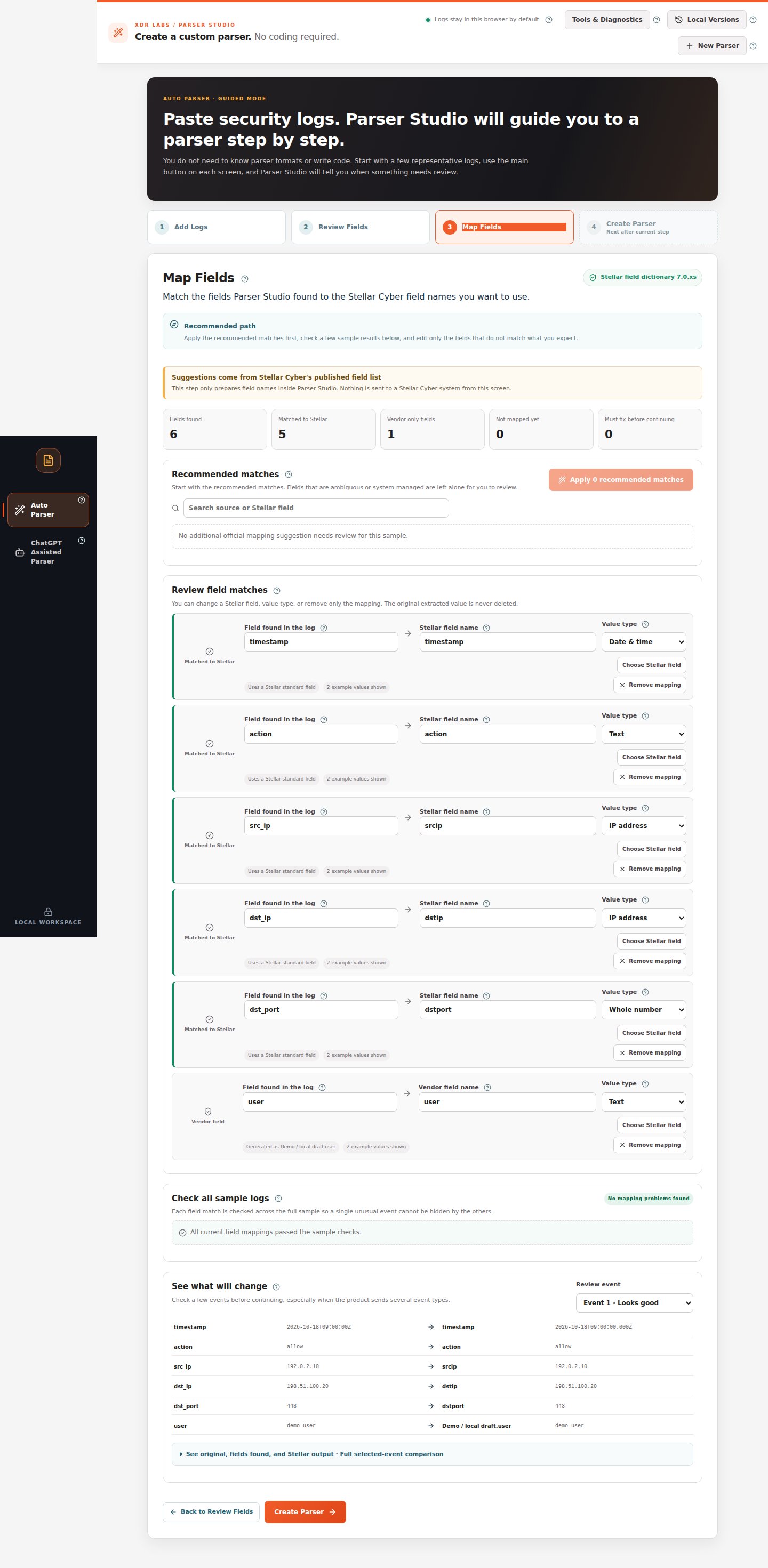
When the suggested mapping is already correct
- Look at Matched to Stellar, Vendor-only fields, and Must fix before continuing.
- Expand Review field matches if you need to inspect a specific field.
- Compare Field found in the log, Stellar field name, Value type, and the example values.
- If the mapping is correct and there are 0 mandatory fixes, continue by pressing Create Parser.
When a field was mapped incorrectly
Suppose the source event contains an IP address, but the proposed field name would change its meaning.- Find the matching source field under Review field matches.
- Use Choose Stellar field (when available) to select the intended field in the field catalog.
- Check Value type (for example, IP address, Network port or Date & time). Do not use a type just because it makes the warning disappear.
- Inspect Check all sample logs and See what will change.
- Reopen a second event using Review event and confirm the new destination receives the same original value.
If a warning blocks the next step
The original source value is not changed by a mapping edit.