

Hands-on: FortiGate Traffic logs forwarded through rsyslog
This scenario uses real FortiGate Traffic and Web Filter example records published by Fortinet, not fabricated firewall events. We submitted those unchanged messages over UDP to an actualrsyslogd input, configured rsyslogd to forward them with a new RFC3164 header, and captured the UDP output bytes. Paste that captured post-relay output below into Parser Studio: this is the exact input used to test the page.
Source versus transport evidence: The security-event bodies are published vendor samples from Fortinet’s official log examples. The outer
relay01 header is not FortiGate output: it is the real output of a separately launched rsyslogd on the lab server. The packet capture is not from a production network or live FortiGate appliance. All original vendor-message bytes were checked unchanged after forwarding. Parser Studio product reference: main a4b4e2f.Download the exact inputs
- Original published FortiGate Traffic log, 2 lines — before relay forwarding.
- Actual rsyslog forwarded capture, 2 lines — copy and paste into Add Logs.
- Independent FortiGate Web Filter original, 1 line — separate published vendor event.
- Actual rsyslog forwarded Web Filter holdout, 1 line — copy and test separately.
- Actual rsyslog capture evidence, including original/captured SHA-256 values.
- Optional reproducible rsyslog capture script (isolated Linux lab; requires rsyslogd and appropriate permissions).
1. Original vendor events — comparison only
The following are the two original Traffic messages, exactly as published in the sample used for testing. Do not paste these into the relay exercise: paste the received relay output in the next section.2. Exact received UDP capture after rsyslog — copy this into Parser Studio
These are the two real UDP datagrams captured after omfwd forwarding, concatenated as newline-delimited events for pasting. The outer header was generated by rsyslog; its timestamp reflects the relay’s capture time, not the original 2019 security event time.srcip=10.1.100.11, dstip=185.244.31.158, sessionid=381780, and action="close" are still part of the FortiGate payload. relay01 is the Syslog forwarder name, not the FortiGate device identity.
Walkthrough
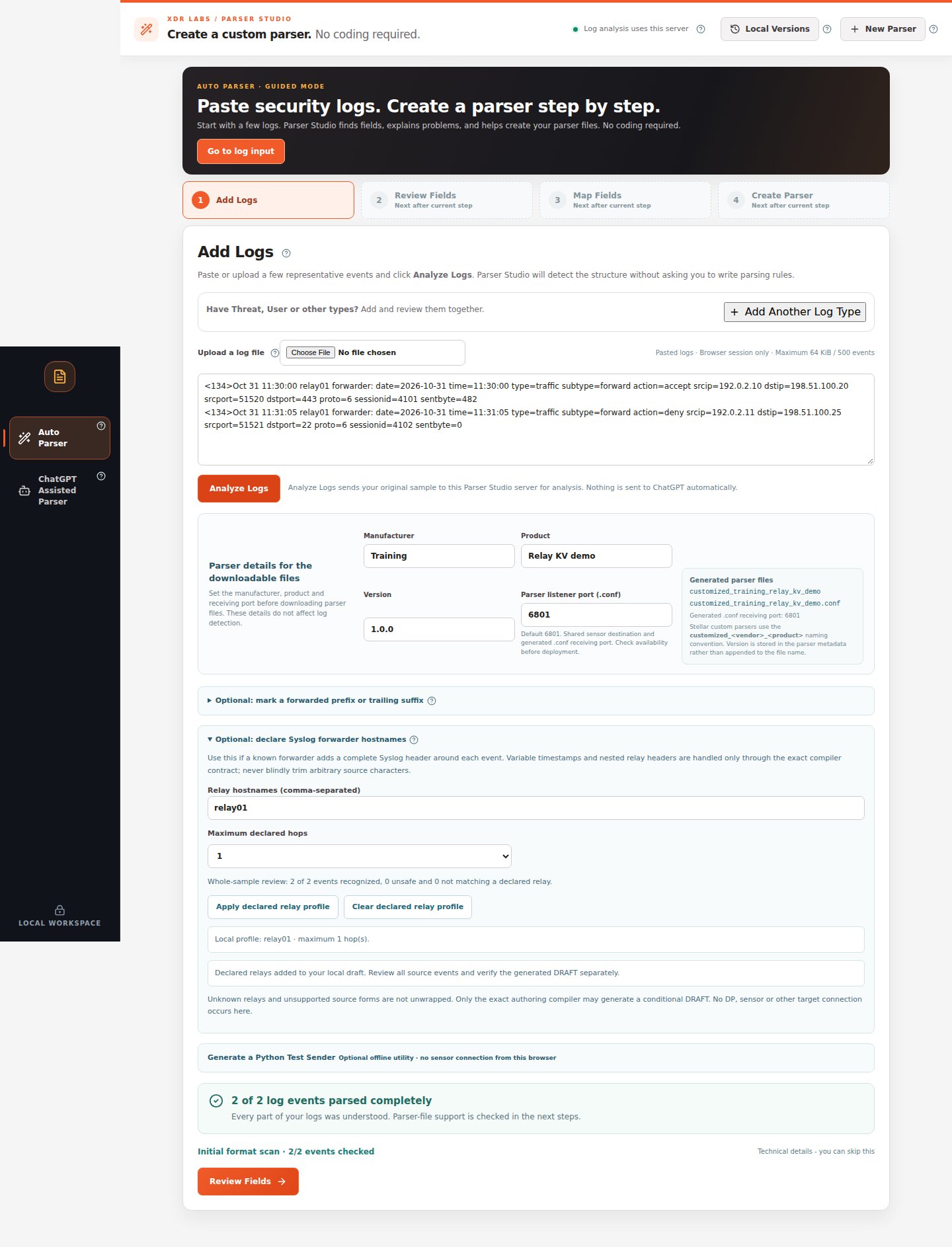
- Open Parser Studio and select Auto Parser. Fill Manufacturer =
Fortinet, Product =FortiGate; no firmware version is inferred from the example lines. Leave the proposed .conf listener port at 6801. - Paste both full lines from Section 2, including the
<134>Syslog prefix, into Add Logs. Alternatively, upload05-relay-forwarded.log. Do not manually remove any prefix or values. - Expand Optional: declare Syslog forwarder hostnames. Set Relay hostnames (comma-separated) to
relay01and Maximum declared hops to1. - Verify Relay source preview says 2 of 2 events recognized, 0 unsafe and 0 not matching a declared relay; click Apply declared relay profile.
- Click Analyze Logs. With this exact captured source, the observed result was 2 of 2 log events parsed completely. If anything differs, inspect the source instead of deleting records.
- Click Review Fields. Check
srcip,dstip,action,proto,sessionidfrom the FortiGate body against the original text. Continue to Map Fields and verify the selected Stellar Cyber 7.0 mapping. - Continue to Create Parser, then click Run Final Test & Create Files only if enabled. The live browser exercise for these source records reached Review Fields; generated parser deployment and actual Stellar Cyber receiver compatibility are separate checks.
3. Independent holdout — test without adding it to your original training sample
This different published Fortinet Web Filter event also passed through real rsyslog forwarding. Paste this one line in a new Auto Parser check withrelay01 declared, rather than using it to build the initial two-event case:
How this capture was produced
The lab usedrsyslogd 8.2312.0, independently launched with imudp input and omfwd UDP output, on loopback-only ephemeral ports. Its custom output template added <134>, relay01, forwarder: and a timestamp while writing %rawmsg% to preserve the original vendor payload. 3/3 payloads were byte-identical to the official source lines. We did not use a Python function to fabricate the Syslog headers.
If you want to reproduce the UDP path on a disposable, authorized Ubuntu lab, download the vendor input files and capture script, and run it there with the required permissions. The script creates a standalone process without restarting the system rsyslog service. It is not a production deployment runbook.
Expected review outcome
In the real public Web UI: 2/2 forwarded Traffic events recognized and fully parsed, plus 1/1 different Web Filter forwarded holdout recognized and fully parsed. Independent target reception, generated artifact native compatibility, and operation on a real FortiGate-to-DP network remain not verified.Recovery path
If the outer header is not recognized, check the exact relay hostname and<PRI> framing. Optional: mark a forwarded prefix or trailing suffix only reviews fixed literal text; it does not configure native conditional unwrapping of changing timestamps. For incomplete events, preserve Text not yet assigned to fields and re-test with additional authentic vendor samples.
Watch the video recorded with these exact forwarded logs · Fortinet original source · Multiple log types