Save, compare, and restore browser-local parser versions
Use Local Versions for up to 30 local parser checkpoints with source and mapping comparison.
Save, compare, and restore local versions
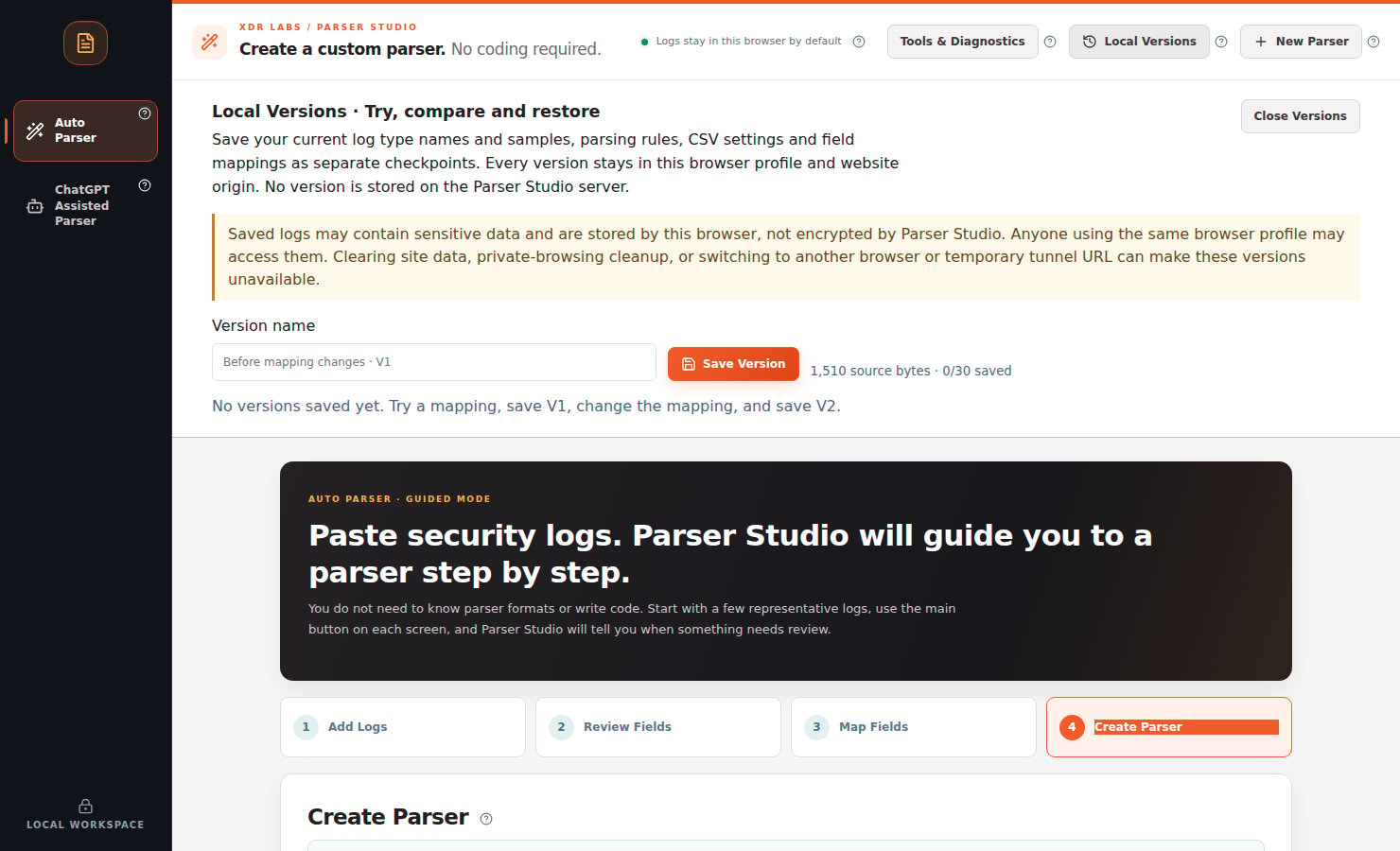
The Local Versions control opens a browser-local workspace for saving the current parser state.
Save a checkpoint
Enter or analyze some sample logs.
Open Local Versions.
Enter a meaningful Version name, such as Before normalization.
Select Save Version.
Make a deliberate change to mappings or sample groups, then save another named version.
Compare and restore
Under Compare Versions, choose Version A and Version B (or Current working copy) to review differences in source logs, parser settings, and field mappings. Use a saved version’s Restore action when you need to roll back your browser workspace.
Storage boundaries
Up to 30 saved versions, scoped to the current browser profile and website origin.
Versions are not stored on the Parser Studio server and do not sync between devices.
The saved data can include raw security logs and is not encrypted by Parser Studio.
Clearing site data, private browser cleanup, or changing profiles/origins may make versions unavailable.
{"docsConfig":{"theme":"mint","$schema":"https://mintlify.com/docs.json","name":"Parser Studio","description":"Beginner-first security log parsing: paste, analyze, review field mappings, troubleshoot and create reviewed parser drafts.","colors":{"primary":"#1F59E0","light":"#2982E8","dark":"#5B8CFF"},"logo":{"light":"https://mintcdn.com/xdr-parser/ikxjh1RO0I43Fgnk/logo/light.svg?fit=max\u0026auto=format\u0026n=ikxjh1RO0I43Fgnk\u0026q=85\u0026s=5302a6b336dc4d20f4ed89fb69585e96","dark":"https://mintcdn.com/xdr-parser/ikxjh1RO0I43Fgnk/logo/dark.svg?fit=max\u0026auto=format\u0026n=ikxjh1RO0I43Fgnk\u0026q=85\u0026s=3d61852283d0e875f806175b341e81dd","href":"https://parser.xdr.ooo"},"favicon":"https://mintcdn.com/xdr-parser/ikxjh1RO0I43Fgnk/favicon.svg?fit=max\u0026auto=format\u0026n=ikxjh1RO0I43Fgnk\u0026q=85\u0026s=260e8e500d0ac2180e93e6e99f048277","appearance":{"default":"system","strict":false},"navbar":{"links":[{"href":"https://xdr.ooo","label":"XDR Labs"},{"href":"https://github.com/xdr-labs/parser-studio","type":"github"}],"primary":{"type":"button","label":"Start with logs","href":"/quickstart"}},"search":{"prompt":"How do I analyze my logs?"},"seo":{"indexing":"navigable"},"styling":{"eyebrows":"breadcrumbs","latex":false},"metadata":{"timestamp":true},"navigation":{"languages":[{"language":"en","href":""},{"language":"ko","navbar":{"links":[{"href":"https://xdr.ooo","label":"XDR Labs"},{"href":"https://parser.xdr.ooo/","label":"영어 문서"}],"primary":{"type":"button","label":"로그로 시작하기","href":"/ko/quickstart"}},"href":"ko"}]}},"deployment":{"deploymentMetadataValue":{"subdomain":"xdr-parser","hasAudioNarration":false,"actualSubdomain":"xdr-parser","customDomains":["parser.xdr.ooo"],"gitSource":{"type":"github","owner":"xdr-labs","repo":"parser-studio-docs","deployBranch":"main","contentDirectory":"","isPrivate":false,"mountPath":"","label":""},"entitlements":{},"buildId":"6ae9d86669138fe59fda8374","clientVersion":"0.0.4143","searchFilterCounts":[{"language":"en","tag":"Auto Parser Scenarios","count":9},{"language":"ko","tag":"자동 파서 사례","count":9},{"language":"en","tag":"Reference","count":6},{"language":"en","tag":"Video Tutorials","count":6},{"language":"en","tag":"Auto Parser","count":6},{"language":"ko","tag":"참고 자료","count":6},{"language":"ko","tag":"동영상 교육","count":6},{"language":"ko","tag":"자동 파서","count":6},{"language":"en","tag":"ChatGPT Assisted Scenarios","count":4},{"language":"ko","tag":"ChatGPT 보조 사례","count":4},{"language":"en","tag":"Start Here","count":3},{"language":"ko","tag":"시작하기","count":3},{"language":"en","tag":"ChatGPT Assisted Parser","count":2},{"language":"ko","tag":"ChatGPT 보조 파서","count":2},{"language":"en","tag":"Scenario Playbooks","count":1},{"language":"ko","tag":"상황별 사용법","count":1}]},"assistantConfig":{"enableAskAiButton":false,"enableStarterQuestions":false,"enableContextualStarterQuestions":false,"enableAskAiSearchBar":true},"basePath":"","hasChatPermissions":false,"hasWebMcpPermissions":false,"toggles":[{"name":"kill-isr","enabled":true,"variant":{"name":"disabled","enabled":false,"feature_enabled":true},"impressionData":false},{"name":"custom-rbac-roles","enabled":true,"variant":{"name":"disabled","enabled":false,"feature_enabled":true},"impressionData":false},{"name":"agent-mintlify-slack","enabled":true,"variant":{"name":"disabled","enabled":false,"feature_enabled":true},"impressionData":false},{"name":"agent-integrations-settings","enabled":true,"variant":{"name":"disabled","enabled":false,"feature_enabled":true},"impressionData":false},{"name":"rbac-expansion","enabled":true,"variant":{"name":"disabled","enabled":false,"feature_enabled":true},"impressionData":false},{"name":"automations-pr-grouping","enabled":true,"variant":{"name":"disabled","enabled":false,"feature_enabled":true},"impressionData":false},{"name":"custom-prefix","enabled":true,"variant":{"name":"disabled","enabled":false,"feature_enabled":true},"impressionData":false},{"name":"analytics-v7","enabled":true,"variant":{"name":"disabled","enabled":false,"feature_enabled":true},"impressionData":false},{"name":"user-flows-analytics","enabled":true,"variant":{"name":"disabled","enabled":false,"feature_enabled":true},"impressionData":false},{"name":"no-publish-flow","enabled":true,"variant":{"name":"disabled","enabled":false,"feature_enabled":true},"impressionData":false},{"name":"workos-onboarding","enabled":true,"variant":{"name":"disabled","enabled":false,"feature_enabled":true},"impressionData":false},{"name":"snapshot-serving-live","enabled":true,"variant":{"name":"disabled","enabled":false,"feature_enabled":true},"impressionData":false},{"name":"stripTemperatureMiddleware","enabled":true,"variant":{"name":"disabled","enabled":false,"feature_enabled":true},"impressionData":false},{"name":"support-platform-pylon-zendesk","enabled":true,"variant":{"name":"disabled","enabled":false,"feature_enabled":true},"impressionData":false},{"name":"snapshot-serving","enabled":true,"variant":{"name":"disabled","enabled":false,"feature_enabled":true},"impressionData":false},{"name":"instant-rollback","enabled":true,"variant":{"name":"disabled","enabled":false,"feature_enabled":true},"impressionData":false},{"name":"granular-notifications-server","enabled":true,"variant":{"name":"disabled","enabled":false,"feature_enabled":true},"impressionData":false},{"name":"granular-notifications","enabled":true,"variant":{"name":"disabled","enabled":false,"feature_enabled":true},"impressionData":false},{"name":"automations-fable","enabled":true,"variant":{"name":"disabled","enabled":false,"feature_enabled":true},"impressionData":false},{"name":"fixed-ai-action-pricing","enabled":true,"variant":{"name":"disabled","enabled":false,"feature_enabled":true},"impressionData":false},{"name":"automation-resolve-merge-conflict","enabled":true,"variant":{"name":"disabled","enabled":false,"feature_enabled":true},"impressionData":false},{"name":"scoped-publishing","enabled":true,"variant":{"name":"disabled","enabled":false,"feature_enabled":true},"impressionData":false},{"name":"mintql","enabled":true,"variant":{"name":"disabled","enabled":false,"feature_enabled":true},"impressionData":false},{"name":"page-level-analytics","enabled":true,"variant":{"name":"disabled","enabled":false,"feature_enabled":true},"impressionData":false},{"name":"editor-version-history-v2","enabled":true,"variant":{"name":"disabled","enabled":false,"feature_enabled":true},"impressionData":false},{"name":"billing-page-v2","enabled":true,"variant":{"name":"disabled","enabled":false,"feature_enabled":true},"impressionData":false},{"name":"full-page-search","enabled":true,"variant":{"name":"disabled","enabled":false,"feature_enabled":true},"impressionData":false},{"name":"workspace-projects","enabled":true,"variant":{"name":"disabled","enabled":false,"feature_enabled":true},"impressionData":false},{"name":"assistant-v5","enabled":true,"variant":{"name":"disabled","enabled":false,"feature_enabled":true},"impressionData":false},{"name":"fork-pr-previews","enabled":true,"variant":{"name":"disabled","enabled":false,"feature_enabled":true},"impressionData":false},{"name":"revalidation-jwt","enabled":true,"variant":{"name":"disabled","enabled":false,"feature_enabled":true},"impressionData":false},{"name":"workos-sso-scim","enabled":true,"variant":{"name":"disabled","enabled":false,"feature_enabled":true},"impressionData":false},{"name":"hobby-abuse-scan","enabled":true,"variant":{"name":"disabled","enabled":false,"feature_enabled":true},"impressionData":false},{"name":"dashboard-inbox","enabled":true,"variant":{"name":"disabled","enabled":false,"feature_enabled":true},"impressionData":false},{"name":"workos-signup","enabled":true,"variant":{"name":"disabled","enabled":false,"feature_enabled":true},"impressionData":false},{"name":"turbopuffer-dual-write","enabled":true,"variant":{"name":"disabled","enabled":false,"feature_enabled":true},"impressionData":false},{"name":"workos-enabled","enabled":true,"variant":{"name":"disabled","enabled":false,"feature_enabled":true},"impressionData":false},{"name":"approve-review-flow","enabled":true,"variant":{"name":"disabled","enabled":false,"feature_enabled":true},"impressionData":false},{"name":"editor-metadata","enabled":true,"variant":{"name":"disabled","enabled":false,"feature_enabled":true},"impressionData":false},{"name":"sso-setup-deadline-banner","enabled":true,"variant":{"name":"disabled","enabled":false,"feature_enabled":true},"impressionData":false},{"name":"turbopuffer-serve","enabled":true,"variant":{"name":"disabled","enabled":false,"feature_enabled":true},"impressionData":false},{"name":"live-agents","enabled":true,"variant":{"name":"disabled","enabled":false,"feature_enabled":true},"impressionData":false},{"name":"llms-txt-v2","enabled":true,"variant":{"name":"disabled","enabled":false,"feature_enabled":true},"impressionData":false}],"googleFontsInlined":false},"customCss":[{"filePath":"style.css","content":":root{--xdr-navy: #0a182d;--xdr-navy-deep: #030f1b;--xdr-blue: #1f59e0;--xdr-blue-bright: #2982e8;--xdr-cyan: #55c7f3;--xdr-orange: #ff9b1d;--xdr-ink: #0f172a;--xdr-muted: #64748b;--xdr-border: rgba(148, 163, 184, 0.22)}html{scroll-behavior:smooth}body{font-family:Inter, ui-sans-serif, system-ui, -apple-system, BlinkMacSystemFont, \"Segoe UI\", sans-serif}h1,h2,h3{letter-spacing:-0.025em}a{text-underline-offset:0.18em}.xdr-hero{position:relative;overflow:hidden;margin:0 0 2.5rem;padding:clamp(2rem, 5vw, 4.5rem);border:1px solid rgba(85, 199, 243, 0.22);border-radius:28px;background:radial-gradient(circle at 82% 18%, rgba(41, 130, 232, 0.42), transparent 30%),\n radial-gradient(circle at 10% 110%, rgba(31, 89, 224, 0.34), transparent 38%),\n linear-gradient(135deg, var(--xdr-navy-deep) 0%, var(--xdr-navy) 58%, #102a51 100%);box-shadow:0 28px 70px rgba(3, 15, 27, 0.24);color:#fff}.xdr-hero::before{content:\"\";position:absolute;inset:0;background-image:linear-gradient(rgba(255, 255, 255, 0.035) 1px, transparent 1px),\n linear-gradient(90deg, rgba(255, 255, 255, 0.035) 1px, transparent 1px);background-size:42px 42px;mask-image:linear-gradient(to bottom, rgba(0, 0, 0, 0.8), transparent 85%)}.xdr-hero::after{content:\"\";position:absolute;width:18rem;height:18rem;right:-5rem;top:-7rem;border-radius:999px;border:1px solid rgba(255, 155, 29, 0.38);box-shadow:0 0 90px rgba(255, 155, 29, 0.1)}.xdr-hero>*{position:relative;z-index:1}.xdr-kicker{margin:0 0 0.9rem;color:#9edfff;font-size:0.78rem;font-weight:800;letter-spacing:0.14em;text-transform:uppercase}.xdr-hero-title{max-width:14ch;margin:0;color:#fff!important;font-size:clamp(2.35rem, 6vw, 4.8rem);font-weight:780;line-height:0.98;letter-spacing:-0.055em}.xdr-hero-copy{max-width:48rem;margin:1.5rem 0 0;color:#d8e6f8;font-size:clamp(1rem, 1.6vw, 1.2rem);line-height:1.75}.xdr-hero-actions{display:flex;flex-wrap:wrap;gap:0.75rem;margin-top:1.8rem}.xdr-hero-actions a{display:inline-flex;align-items:center;justify-content:center;min-height:2.9rem;padding:0.72rem 1.1rem;border-radius:999px;font-weight:750;text-decoration:none!important;transition:transform 160ms ease, box-shadow 160ms ease, border-color 160ms ease}.xdr-hero-actions a:hover{transform:translateY(-1px)}.xdr-hero-primary{background:linear-gradient(135deg, var(--xdr-blue), #1E4EB8);color:#fff!important;box-shadow:0 12px 28px rgba(31, 89, 224, 0.34)}.xdr-hero-secondary{border:1px solid rgba(255, 255, 255, 0.24);background:rgba(255, 255, 255, 0.07);color:#fff!important;backdrop-filter:blur(10px)}.xdr-signal-grid{display:grid;grid-template-columns:repeat(3, minmax(0, 1fr));gap:0.75rem;margin-top:2.1rem}.xdr-signal{min-height:7.25rem;padding:1rem 1.05rem;border:1px solid rgba(255, 255, 255, 0.12);border-radius:18px;background:rgba(5, 18, 38, 0.48);backdrop-filter:blur(12px)}.xdr-signal strong{display:block;margin-bottom:0.35rem;color:#fff;font-size:1rem}.xdr-signal span{color:#b9cbe0;font-size:0.88rem;line-height:1.5}.xdr-section-intro{max-width:47rem;margin:-0.4rem 0 1.25rem;color:var(--xdr-muted);font-size:1.02rem;line-height:1.7}article h2{margin-top:2.8rem}article table{border-radius:16px;overflow:hidden}article img{border-radius:14px}.dark .xdr-section-intro{color:#94a3b8}@media (max-width: 720px){.xdr-hero{padding:1.6rem;border-radius:22px}.xdr-hero-title{font-size:clamp(2.15rem, 12vw, 3.2rem)}.xdr-hero-actions{flex-direction:column}.xdr-hero-actions a{width:100%}.xdr-signal-grid{grid-template-columns:1fr}}@media (prefers-reduced-motion: reduce){html{scroll-behavior:auto}.xdr-hero-actions a{transition:none}}.ps-shot{margin:1.3rem 0 2rem}.ps-shot img{display:block;width:100%;height:auto;border:1px solid var(--xdr-border);border-radius:16px;box-shadow:0 16px 36px rgba(10,24,45,.11)}.ps-shot figcaption{font-size:.87rem;line-height:1.55;color:var(--xdr-muted);margin-top:.6rem}.dark .ps-shot figcaption{color:#a7b8cc}.ps-flow{display:flex;flex-wrap:wrap;align-items:center;gap:.55rem;margin:1.2rem 0 2rem}.ps-flow span{border:1px solid rgba(31,89,224,.25);background:rgba(31,89,224,.06);border-radius:12px;padding:.65rem .8rem;font-weight:700;font-size:.88rem}.ps-flow b{color:var(--xdr-blue);font-weight:800}.ps-step-graphic{max-width:100%;border:1px solid var(--xdr-border);border-radius:16px}@media (max-width:720px){.ps-shot img{border-radius:12px}.ps-flow{gap:.3rem}.ps-flow span{font-size:.76rem}}"}],"page":{"pagePath":"workflows/local-versions","slug":"/workflows/local-versions","pageMetadata":{"title":"Save, compare, and restore browser-local parser versions","sidebarTitle":"Local Versions","description":"Use Local Versions for up to 30 local parser checkpoints with source and mapping comparison.","href":"/workflows/local-versions"},"description":{"compiledSource":"\"use strict\";\nconst {jsx: _jsx} = arguments[0];\nconst {useMDXComponents: _provideComponents} = arguments[0];\nfunction _createMdxContent(props) {\n const _components = {\n p: \"p\",\n ..._provideComponents(),\n ...props.components\n };\n return _jsx(_components.p, {\n children: \"Use Local Versions for up to 30 local parser checkpoints with source and mapping comparison.\"\n });\n}\nfunction MDXContent(props = {}) {\n const {wrapper: MDXLayout} = {\n ..._provideComponents(),\n ...props.components\n };\n return MDXLayout ? _jsx(MDXLayout, {\n ...props,\n children: _jsx(_createMdxContent, {\n ...props\n })\n }) : _createMdxContent(props);\n}\nreturn {\n default: MDXContent\n};\n","frontmatter":{},"scope":{}},"pageType":"default","mdx":{"mdxSource":{"compiledSource":"\"use strict\";const{Fragment:_Fragment,jsx:_jsx,jsxs:_jsxs}=arguments[0];const{useMDXComponents:_provideComponents}=arguments[0];function _createMdxContent(props){const _components={a:`a`,li:`li`,ol:`ol`,p:`p`,strong:`strong`,ul:`ul`,..._provideComponents(),...props.components},{Heading,OptimizedImage}=_components;if(!Heading)_missingMdxReference(`Heading`,true);if(!OptimizedImage)_missingMdxReference(`OptimizedImage`,true);return _jsxs(_Fragment,{children:[_jsx(Heading,{level:`1`,id:`save-compare-and-restore-local-versions`,children:`Save, compare, and restore local versions`}),`\n`,_jsxs(_components.p,{children:[`The `,_jsx(_components.strong,{children:`Local Versions`}),` control opens a browser-local workspace for saving the current parser state.`]}),`\n`,_jsx(OptimizedImage,{src:`https://mintcdn.com/xdr-parser/eZQo8zkyp__tw0U0/images/current-07-local-versions.png?fit=max\u0026auto=format\u0026n=eZQo8zkyp__tw0U0\u0026q=85\u0026s=4b96326e1ae327eff05870fe8dc68cde`,alt:`Current Local Versions workspace`,\"data-og-width\":`1480`,width:`1480`,\"data-og-height\":`900`,height:`900`,\"data-path\":`images/current-07-local-versions.png`,\"data-optimize\":`true`,\"data-opv\":`3`,srcset:`https://mintcdn.com/xdr-parser/eZQo8zkyp__tw0U0/images/current-07-local-versions.png?w=280\u0026fit=max\u0026auto=format\u0026n=eZQo8zkyp__tw0U0\u0026q=85\u0026s=0d91319daad967240e902f376694b2e5 280w, https://mintcdn.com/xdr-parser/eZQo8zkyp__tw0U0/images/current-07-local-versions.png?w=560\u0026fit=max\u0026auto=format\u0026n=eZQo8zkyp__tw0U0\u0026q=85\u0026s=68349195104fdad82ce3eea63df97717 560w, https://mintcdn.com/xdr-parser/eZQo8zkyp__tw0U0/images/current-07-local-versions.png?w=840\u0026fit=max\u0026auto=format\u0026n=eZQo8zkyp__tw0U0\u0026q=85\u0026s=969799a69642384b9e1caecb04efbc6c 840w, https://mintcdn.com/xdr-parser/eZQo8zkyp__tw0U0/images/current-07-local-versions.png?w=1100\u0026fit=max\u0026auto=format\u0026n=eZQo8zkyp__tw0U0\u0026q=85\u0026s=aafe801bc60740624f4c9b3a2e944f3c 1100w, https://mintcdn.com/xdr-parser/eZQo8zkyp__tw0U0/images/current-07-local-versions.png?w=1650\u0026fit=max\u0026auto=format\u0026n=eZQo8zkyp__tw0U0\u0026q=85\u0026s=613e9517a8bef853edebfbfc00ead0f1 1650w, https://mintcdn.com/xdr-parser/eZQo8zkyp__tw0U0/images/current-07-local-versions.png?w=2500\u0026fit=max\u0026auto=format\u0026n=eZQo8zkyp__tw0U0\u0026q=85\u0026s=18ae83977b1b193594d2ba75e37eb0a5 2500w`}),`\n`,_jsx(Heading,{level:`2`,id:`save-a-checkpoint`,children:`Save a checkpoint`}),`\n`,_jsxs(_components.ol,{children:[`\n`,_jsx(_components.li,{children:`Enter or analyze some sample logs.`}),`\n`,_jsxs(_components.li,{children:[`Open `,_jsx(_components.strong,{children:`Local Versions`}),`.`]}),`\n`,_jsxs(_components.li,{children:[`Enter a meaningful `,_jsx(_components.strong,{children:`Version name`}),`, such as Before normalization.`]}),`\n`,_jsxs(_components.li,{children:[`Select `,_jsx(_components.strong,{children:`Save Version`}),`.`]}),`\n`,_jsx(_components.li,{children:`Make a deliberate change to mappings or sample groups, then save another named version.`}),`\n`]}),`\n`,_jsx(Heading,{level:`2`,id:`compare-and-restore`,children:`Compare and restore`}),`\n`,_jsxs(_components.p,{children:[`Under `,_jsx(_components.strong,{children:`Compare Versions`}),`, choose Version A and Version B (or Current working copy) to review differences in source logs, parser settings, and field mappings. Use a saved version’s `,_jsx(_components.strong,{children:`Restore`}),` action when you need to roll back your browser workspace.`]}),`\n`,_jsx(Heading,{level:`2`,id:`storage-boundaries`,children:`Storage boundaries`}),`\n`,_jsxs(_components.ul,{children:[`\n`,_jsxs(_components.li,{children:[`Up to `,_jsx(_components.strong,{children:`30 saved versions`}),`, scoped to the current browser profile and website origin.`]}),`\n`,_jsxs(_components.li,{children:[`Versions are `,_jsx(_components.strong,{children:`not stored on the Parser Studio server`}),` and do not sync between devices.`]}),`\n`,_jsxs(_components.li,{children:[`The saved data can include raw security logs and is `,_jsx(_components.strong,{children:`not encrypted by Parser Studio`}),`.`]}),`\n`,_jsx(_components.li,{children:`Clearing site data, private browser cleanup, or changing profiles/origins may make versions unavailable.`}),`\n`]}),`\n`,_jsx(_components.p,{children:`Saving a local version is not a native parser test, repository commit, or deployment operation.`}),`\n`,_jsxs(_components.p,{children:[_jsx(_components.a,{href:`/workflows/auto-parser`,children:`Auto Parser`}),` · `,_jsx(_components.a,{href:`/scenarios/revisions`,children:`Compare versions scenario`})]})]})}function MDXContent(props={}){const{wrapper:MDXLayout}={..._provideComponents(),...props.components};return MDXLayout?_jsx(MDXLayout,{...props,children:_jsx(_createMdxContent,{...props})}):_createMdxContent(props)}return{default:MDXContent};function _missingMdxReference(id,component){throw new Error(`Expected `+(component?`component`:`object`)+\" `\"+id+\"` to be defined: you likely forgot to import, pass, or provide it.\")}","frontmatter":{},"scope":{"config":{},"pageMetadata":{"title":"Save, compare, and restore browser-local parser versions","sidebarTitle":"Local Versions","description":"Use Local Versions for up to 30 local parser checkpoints with source and mapping comparison.","href":"/workflows/local-versions"}}},"mdxSourceWithNoJs":null},"mdxExtracts":{"tableOfContents":[{"title":"Save, compare, and restore local versions","slug":"save-compare-and-restore-local-versions","depth":1,"children":[]},{"title":"Save a checkpoint","slug":"save-a-checkpoint","depth":2,"children":[]},{"title":"Compare and restore","slug":"compare-and-restore","depth":2,"children":[]},{"title":"Storage boundaries","slug":"storage-boundaries","depth":2,"children":[]}],"codeExamples":{}},"jsLinks":[],"subdomain":"xdr-parser","siteName":"Parser Studio","title":"Save, compare, and restore browser-local parser versions - Parser Studio","navMaps":{"firstHrefInVersion":{},"firstHrefInLanguage":{"en":{"href":"/workflows/local-versions","matchLevel":0},"ko":{"href":"/ko/workflows/local-versions","matchLevel":1}}},"lastModified":"2026-10-21T11:43:27.716Z","gitLastModified":"2026-10-21T11:43:18.000Z","originalFileLocation":"workflows/local-versions.mdx","locale":"en"},"headHtml":"\u003cscript data-mint-head>(function(){var d=document.documentElement,p=null;if(!p){try{p=localStorage.getItem(\"isDarkMode\")}catch(e){}if(p==='true')p='dark';else if(p==='false')p='light';if(p!=='light'\u0026\u0026p!=='dark'\u0026\u0026p!=='system')p=\"system\"}var r=p==='system'?(matchMedia(\"(prefers-color-scheme: dark)\").matches?'dark':'light'):p;d.classList.remove(r==='dark'?'light':'dark');d.classList.add(r);d.setAttribute(\"data-theme-preference\",p)})();\u003c/script>\u003cmeta data-mint-head name=\"description\" content=\"Use Local Versions for up to 30 local parser checkpoints with source and mapping comparison.\">\u003cmeta data-mint-head name=\"application-name\" content=\"Parser Studio\">\u003cmeta data-mint-head name=\"generator\" content=\"Mintlify\">\u003clink data-mint-head rel=\"icon\" type=\"image/png\" sizes=\"192x192\" href=\"/mintlify-assets/_mintlify/favicons/xdr-parser/YjiRvGtQHtPcUWmA/_generated/favicon/android-chrome-192x192.png\" media=\"(prefers-color-scheme: light)\">\u003clink data-mint-head rel=\"apple-touch-icon\" type=\"image/png\" sizes=\"180x180\" href=\"/mintlify-assets/_mintlify/favicons/xdr-parser/YjiRvGtQHtPcUWmA/_generated/favicon/apple-touch-icon.png\">\u003clink data-mint-head rel=\"icon\" type=\"image/png\" sizes=\"16x16\" href=\"/mintlify-assets/_mintlify/favicons/xdr-parser/YjiRvGtQHtPcUWmA/_generated/favicon/favicon-16x16.png\" media=\"(prefers-color-scheme: light)\">\u003clink data-mint-head rel=\"icon\" type=\"image/png\" sizes=\"32x32\" href=\"/mintlify-assets/_mintlify/favicons/xdr-parser/YjiRvGtQHtPcUWmA/_generated/favicon/favicon-32x32.png\" media=\"(prefers-color-scheme: light)\">\u003clink data-mint-head rel=\"shortcut icon\" type=\"image/x-icon\" href=\"/mintlify-assets/_mintlify/favicons/xdr-parser/YjiRvGtQHtPcUWmA/_generated/favicon/favicon.ico\" media=\"(prefers-color-scheme: light)\">\u003clink data-mint-head rel=\"icon\" type=\"image/png\" sizes=\"192x192\" href=\"/mintlify-assets/_mintlify/favicons/xdr-parser/YjiRvGtQHtPcUWmA/_generated/favicon-dark/android-chrome-192x192.png\" media=\"(prefers-color-scheme: dark)\">\u003clink data-mint-head rel=\"icon\" type=\"image/png\" sizes=\"16x16\" href=\"/mintlify-assets/_mintlify/favicons/xdr-parser/YjiRvGtQHtPcUWmA/_generated/favicon-dark/favicon-16x16.png\" media=\"(prefers-color-scheme: dark)\">\u003clink data-mint-head rel=\"icon\" type=\"image/png\" sizes=\"32x32\" href=\"/mintlify-assets/_mintlify/favicons/xdr-parser/YjiRvGtQHtPcUWmA/_generated/favicon-dark/favicon-32x32.png\" media=\"(prefers-color-scheme: dark)\">\u003clink data-mint-head rel=\"shortcut icon\" type=\"image/x-icon\" href=\"/mintlify-assets/_mintlify/favicons/xdr-parser/YjiRvGtQHtPcUWmA/_generated/favicon-dark/favicon.ico\" media=\"(prefers-color-scheme: dark)\">\u003cmeta data-mint-head property=\"og:title\" content=\"Save, compare, and restore browser-local parser versions - Parser Studio\">\u003cmeta data-mint-head property=\"og:description\" content=\"Use Local Versions for up to 30 local parser checkpoints with source and mapping comparison.\">\u003cmeta data-mint-head property=\"og:site_name\" content=\"Parser Studio\">\u003cmeta data-mint-head property=\"og:url\" content=\"https://parser.xdr.ooo/workflows/local-versions\">\u003cmeta data-mint-head property=\"og:type\" content=\"website\">\u003cmeta data-mint-head property=\"og:image\" content=\"https://xdr-parser.mintlify.site/_mintlify/api/og/v2?division=Auto+Parser\u0026amp;title=Save%2C+compare%2C+and+restore+browser-local+parser+versions\u0026amp;description=Use+Local+Versions+for+up+to+30+local+parser+checkpoints+with+source+and+mapping+comparison.\u0026amp;theme=b77135e4f95734bd786c2395\u0026amp;signature=fe20a811bd6059201da27dabf3ebafa2f318d50bc045f2de8744733096e32222\">\u003cmeta data-mint-head property=\"og:image:width\" content=\"1200\">\u003cmeta data-mint-head property=\"og:image:height\" content=\"630\">\u003cmeta data-mint-head name=\"twitter:card\" content=\"summary_large_image\">\u003cmeta data-mint-head name=\"twitter:title\" content=\"Save, compare, and restore browser-local parser versions - Parser Studio\">\u003cmeta data-mint-head name=\"twitter:description\" content=\"Use Local Versions for up to 30 local parser checkpoints with source and mapping comparison.\">\u003cmeta data-mint-head name=\"twitter:image\" content=\"https://xdr-parser.mintlify.site/_mintlify/api/og/v2?division=Auto+Parser\u0026amp;title=Save%2C+compare%2C+and+restore+browser-local+parser+versions\u0026amp;description=Use+Local+Versions+for+up+to+30+local+parser+checkpoints+with+source+and+mapping+comparison.\u0026amp;theme=b77135e4f95734bd786c2395\u0026amp;signature=fe20a811bd6059201da27dabf3ebafa2f318d50bc045f2de8744733096e32222\">\u003cmeta data-mint-head name=\"twitter:image:width\" content=\"1200\">\u003cmeta data-mint-head name=\"twitter:image:height\" content=\"630\">\u003cmeta data-mint-head name=\"msapplication-config\" content=\"/mintlify-assets/_mintlify/favicons/xdr-parser/YjiRvGtQHtPcUWmA/_generated/favicon/browserconfig.xml\">\u003cmeta data-mint-head name=\"apple-mobile-web-app-title\" content=\"Parser Studio\">\u003cmeta data-mint-head name=\"msapplication-TileColor\" content=\"#1F59E0\">\u003clink data-mint-head rel=\"canonical\" href=\"https://parser.xdr.ooo/workflows/local-versions\">\u003clink data-mint-head rel=\"alternate\" type=\"application/xml\" href=\"/sitemap.xml\">\u003clink data-mint-head rel=\"alternate\" type=\"text/markdown\" href=\"/workflows/local-versions.md\">\u003clink data-mint-head rel=\"alternate\" hreflang=\"en\" href=\"https://parser.xdr.ooo/workflows/local-versions\">\u003clink data-mint-head rel=\"alternate\" hreflang=\"ko\" href=\"https://parser.xdr.ooo/ko/workflows/local-versions\">\u003clink data-mint-head rel=\"alternate\" hreflang=\"x-default\" href=\"https://parser.xdr.ooo/workflows/local-versions\">\u003cscript data-mint-head type=\"application/ld+json\">{\"@context\":\"https://schema.org\",\"@graph\":[{\"@type\":\"Organization\",\"@id\":\"https://parser.xdr.ooo/#organization\",\"name\":\"Parser Studio\",\"url\":\"https://parser.xdr.ooo\",\"logo\":{\"@type\":\"ImageObject\",\"url\":\"https://mintcdn.com/xdr-parser/ikxjh1RO0I43Fgnk/logo/light.svg?fit=max\u0026auto=format\u0026n=ikxjh1RO0I43Fgnk\u0026q=85\u0026s=5302a6b336dc4d20f4ed89fb69585e96\"}},{\"@type\":\"WebSite\",\"@id\":\"https://parser.xdr.ooo#website\",\"name\":\"Parser Studio\",\"url\":\"https://parser.xdr.ooo\",\"publisher\":{\"@id\":\"https://parser.xdr.ooo/#organization\"}},{\"@type\":\"WebPage\",\"@id\":\"https://parser.xdr.ooo/workflows/local-versions#webpage\",\"url\":\"https://parser.xdr.ooo/workflows/local-versions\",\"name\":\"Save, compare, and restore browser-local parser versions\",\"description\":\"Use Local Versions for up to 30 local parser checkpoints with source and mapping comparison.\",\"dateModified\":\"2026-10-21T11:43:18.000Z\",\"isPartOf\":{\"@id\":\"https://parser.xdr.ooo#website\"},\"breadcrumb\":{\"@id\":\"https://parser.xdr.ooo/workflows/local-versions#breadcrumb\"}},{\"@type\":\"BreadcrumbList\",\"@id\":\"https://parser.xdr.ooo/workflows/local-versions#breadcrumb\",\"itemListElement\":[{\"@type\":\"ListItem\",\"position\":1,\"name\":\"Auto Parser\",\"item\":\"https://parser.xdr.ooo/workflows/auto-parser\"},{\"@type\":\"ListItem\",\"position\":2,\"name\":\"Save, compare, and restore browser-local parser versions\",\"item\":\"https://parser.xdr.ooo/workflows/local-versions\"}]},{\"@type\":[\"Article\",\"TechArticle\"],\"@id\":\"https://parser.xdr.ooo/workflows/local-versions#article\",\"headline\":\"Save, compare, and restore browser-local parser versions\",\"name\":\"Save, compare, and restore browser-local parser versions\",\"description\":\"Use Local Versions for up to 30 local parser checkpoints with source and mapping comparison.\",\"url\":\"https://parser.xdr.ooo/workflows/local-versions\",\"mainEntityOfPage\":{\"@id\":\"https://parser.xdr.ooo/workflows/local-versions#webpage\"},\"dateModified\":\"2026-10-21T11:43:18.000Z\",\"publisher\":{\"@id\":\"https://parser.xdr.ooo/#organization\"},\"isPartOf\":{\"@id\":\"https://parser.xdr.ooo#website\"}}]}\u003c/script>\u003cscript data-mint-head type=\"application/ld+json\">{\"@context\":\"https://schema.org\",\"@type\":\"WebSite\",\"name\":\"Parser Studio\",\"publisher\":{\"@type\":\"Organization\",\"name\":\"Parser Studio\"},\"provider\":{\"@type\":\"Organization\",\"name\":\"Mintlify\",\"url\":\"https://mintlify.com\"}}\u003c/script>","agentPointerHref":"/workflows/local-versions.md","siteName":"Parser Studio","nav":{"global":null,"languages":[{"language":"en","groups":[{"group":"Start Here","icon":"rocket","pages":[{"title":"Parser Studio | Start with your logs","sidebarTitle":"Overview","href":""},{"title":"Quickstart | Paste logs and create a parser","sidebarTitle":"My First Parser","href":"/quickstart"},{"title":"Choose what to do next","sidebarTitle":"What Do I Do Next?","href":"/choose-workflow"}]},{"group":"Video Tutorials","icon":"circle-play","pages":[{"title":"Parser Studio Video Tutorials","sidebarTitle":"Video Tutorials","href":"/videos/index"},{"title":"Complete Parsing: Real Juniper SRX Logs","sidebarTitle":"01 · Complete Parsing","href":"/videos/complete"},{"title":"Partial Parsing: Complex Sophos XG Firewall Logs","sidebarTitle":"02 · Partial Parsing","href":"/videos/partial"},{"title":"Unrecognized Snort Alert: ChatGPT-Assisted Recovery","sidebarTitle":"03 · Unrecognized Snort Alert","href":"/videos/unknown"},{"title":"Multiple Event Types: Real FortiGate Traffic and Threat Logs","sidebarTitle":"04 · Multiple Event Types","href":"/videos/multiple-types"},{"title":"Video: RFC3164 Syslog Relay Walkthrough","sidebarTitle":"05 · Syslog Relay","href":"/videos/relay"}]},{"group":"Auto Parser","icon":"wand-magic-sparkles","pages":[{"title":"Auto Parser | From pasted logs to files","sidebarTitle":"Auto Parser","href":"/workflows/auto-parser"},{"title":"Review Fields | Are the values correct?","sidebarTitle":"Review Extracted Values","href":"/workflows/review-fields"},{"title":"Map Fields | Fix output field names","sidebarTitle":"Fix Field Names","href":"/workflows/map-fields"},{"title":"Create Parser | Final test and file download","sidebarTitle":"Download Parser Files","href":"/workflows/create-and-download"},{"title":"Parser identity, listener port, and forwarded log boundaries","sidebarTitle":"Parser Setup","description":"Configure source metadata, the listener port, and explicit relay prefix or postfix marks.","href":"/workflows/parser-setup"},{"title":"Save, compare, and restore browser-local parser versions","sidebarTitle":"Local Versions","href":"/workflows/local-versions"}]},{"group":"ChatGPT Assisted Parser","icon":"comments","pages":[{"title":"ChatGPT Assisted Parser | When logs are unfamiliar","sidebarTitle":"Use ChatGPT","description":"Use the current two-path UI to review a source-bearing prompt, test a constrained recipe, and approve a draft.","href":"/workflows/chatgpt-assisted"},{"title":"Check a proposed fix on new logs","sidebarTitle":"Check a Suggested Fix","href":"/workflows/holdout-validation"}]},{"group":"Scenario Playbooks","icon":"compass","pages":[{"title":"Scenario Playbooks: choose what happened","sidebarTitle":"Choose My Situation","href":"/scenarios/index"}]},{"group":"Auto Parser Scenarios","icon":"wand-magic-sparkles","pages":[{"title":"Auto Parser: all logs were recognized","sidebarTitle":"All Logs Recognized","href":"/scenarios/auto-success"},{"title":"One log is only partly parsed | Fix the highlighted section","sidebarTitle":"Some Fields Missing","href":"/scenarios/partial-event"},{"title":"Auto Parser: one product sends several event types","sidebarTitle":"Multiple Event Types","href":"/scenarios/mixed-events"},{"title":"Auto Parser: source values have no names","sidebarTitle":"Unnamed Values","href":"/scenarios/unnamed-values"},{"title":"The fields were found, but their output names are wrong","sidebarTitle":"Wrong Output Field","href":"/scenarios/normalization"},{"title":"Auto Parser: one event spans several lines","sidebarTitle":"Long Events","href":"/scenarios/long-events"},{"title":"Compare two parser attempts without losing your work","sidebarTitle":"Compare Parser Attempts","href":"/scenarios/revisions"},{"title":"Create changing test logs from your sample","sidebarTitle":"Generate Test Logs","href":"/scenarios/test-sender"},{"title":"FortiGate Logs Forwarded by a Real rsyslog Relay","sidebarTitle":"FortiGate via rsyslog","href":"/scenarios/relay-forwarder"}]},{"group":"ChatGPT Assisted Scenarios","icon":"comments","pages":[{"title":"Parser Studio does not understand my log","sidebarTitle":"Log Not Understood","href":"/scenarios/unknown-log"},{"title":"Use ChatGPT to fix an unfamiliar field","sidebarTitle":"ChatGPT Walkthrough","href":"/scenarios/recipe-ai"},{"title":"ChatGPT: the suggested result was rejected","sidebarTitle":"AI Result Rejected","href":"/scenarios/ai-invalid-response"},{"title":"ChatGPT: test the proposed fix on other logs","sidebarTitle":"Check a Proposed Fix","href":"/scenarios/ai-test-change"}]},{"group":"Reference","icon":"book-open","pages":[{"title":"What kinds of logs can I paste?","sidebarTitle":"How Formats Work","href":"/reference/supported-formats"},{"title":"Which files can I download?","sidebarTitle":"Downloaded Files","href":"/reference/output-artifacts"},{"title":"What happens to the logs I paste?","sidebarTitle":"Protect Sensitive Logs","href":"/reference/source-privacy"},{"title":"Something went wrong—what should I click?","sidebarTitle":"Fix a Problem","href":"/reference/troubleshooting"},{"title":"Plain-language words used by Parser Studio","sidebarTitle":"Glossary","href":"/reference/glossary"},{"title":"Common beginner questions","sidebarTitle":"Frequently Asked Questions","href":"/reference/faq"}]}]},{"language":"ko","navbar":{"links":[{"href":"https://xdr.ooo","label":"XDR Labs"},{"href":"https://parser.xdr.ooo/","label":"영어 문서"}],"primary":{"type":"button","label":"로그로 시작하기","href":"/ko/quickstart"}},"pages":[{"title":"ko","href":"/ko/workflows/local-versions"}]}]},"basePath":"","title":"Save, compare, and restore browser-local parser versions - Parser Studio","buildId":"dpl_Fyv1NbzwP68g2bEH2Roy98uY1zmE","deploymentId":"dpl_Fyv1NbzwP68g2bEH2Roy98uY1zmE","dynamics":["a74be98ba7"],"chunks":["zoom-image-lightbox-BbK2OBGL.js","lightbox-handle-r17bVUz3.js"]}