Parser identity, listener port, and forwarded log boundaries
Configure source metadata, the listener port, and explicit relay prefix or postfix marks.
Configure the parser source and listener
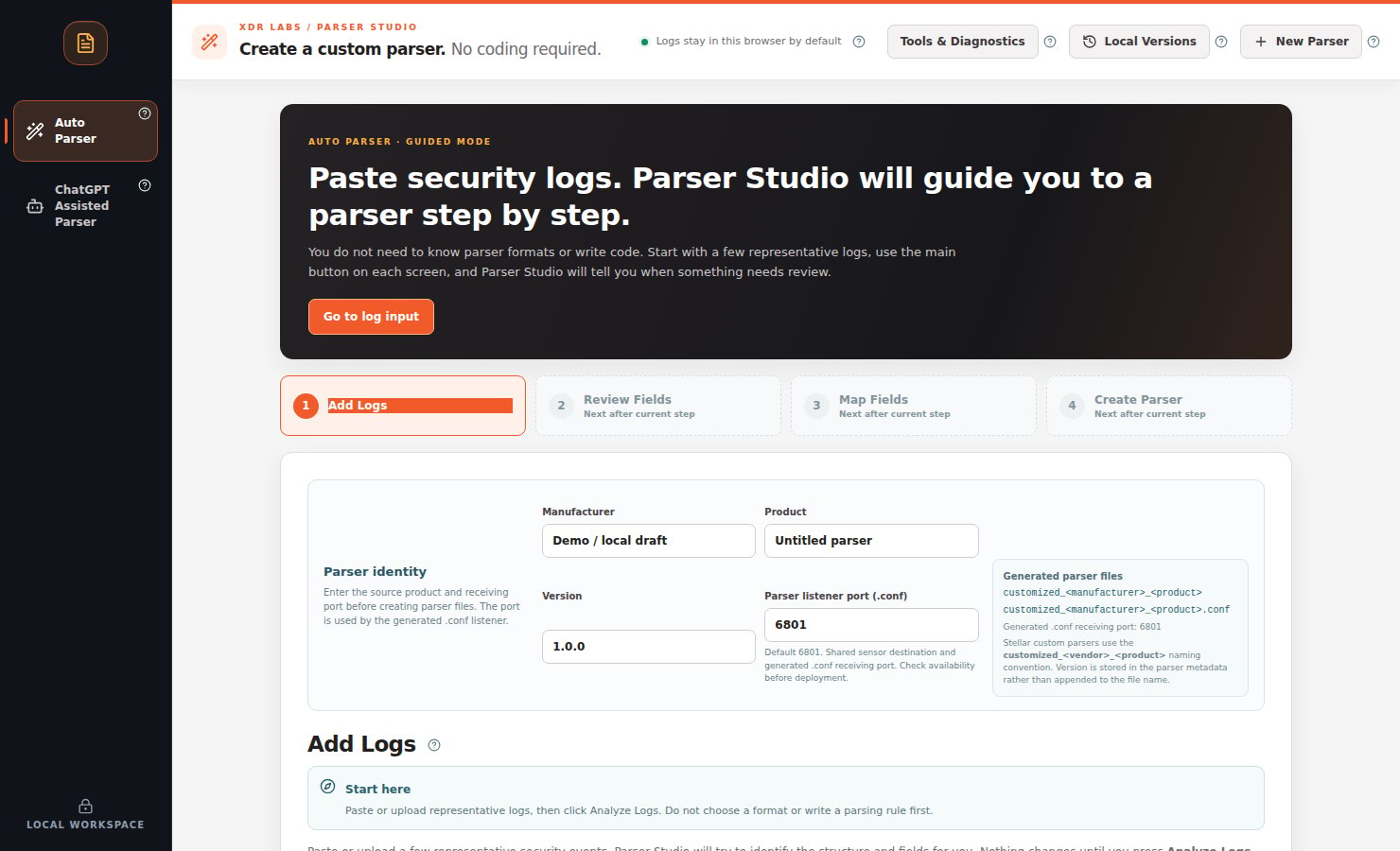
The current Auto Parser uses Parser identity to name files and choose the listener port stored in the generated configuration.
Identity fields
Manufacturer: the product manufacturer, such as Fortinet.
Product: the actual device or service product, such as FortiGate.
Version: optional, only if established from a reliable product record.
Parser listener port (.conf): the receiving port in the generated CONF. The current default is 6801.
The customized_vendor_product naming convention derives from manufacturer/product; version belongs to metadata, not the filename.
Explicit forwarding boundaries
Some upstream relays add text before or after a vendor record. Parser Studio does not assume it can safely strip this prefix automatically.
Paste the original forwarded records.
Expand Optional: mark a forwarded prefix or trailing suffix.
Select the exact bytes corresponding to the relay’s addition, then choose Mark selection as prefix or Mark selection as postfix.
Check the proposed marks and select Apply declared relay profile only when they match the actual source.
For known Syslog relays, optionally use Optional: declare Syslog forwarder hostnames.
Check sample framing and exact byte positions. Upload original files instead of pasting if CRLF preservation matters.
Practical limits and verification
The current analysis limit is 64 KiB or 500 logical events per input. Successful source extraction alone does not verify a deployable Fluentd parser or Stellar Cyber ingestion.Auto Parser workflow · Create and download
Last modified on October 21, 2026
{"docsConfig":{"theme":"mint","$schema":"https://mintlify.com/docs.json","name":"Parser Studio","description":"Beginner-first security log parsing: paste, analyze, review field mappings, troubleshoot and create reviewed parser drafts.","colors":{"primary":"#1F59E0","light":"#2982E8","dark":"#5B8CFF"},"logo":{"light":"https://mintcdn.com/xdr-parser/ikxjh1RO0I43Fgnk/logo/light.svg?fit=max\u0026auto=format\u0026n=ikxjh1RO0I43Fgnk\u0026q=85\u0026s=5302a6b336dc4d20f4ed89fb69585e96","dark":"https://mintcdn.com/xdr-parser/ikxjh1RO0I43Fgnk/logo/dark.svg?fit=max\u0026auto=format\u0026n=ikxjh1RO0I43Fgnk\u0026q=85\u0026s=3d61852283d0e875f806175b341e81dd","href":"https://parser.xdr.ooo"},"favicon":"https://mintcdn.com/xdr-parser/ikxjh1RO0I43Fgnk/favicon.svg?fit=max\u0026auto=format\u0026n=ikxjh1RO0I43Fgnk\u0026q=85\u0026s=260e8e500d0ac2180e93e6e99f048277","appearance":{"default":"system","strict":false},"navbar":{"links":[{"href":"https://xdr.ooo","label":"XDR Labs"},{"href":"https://github.com/xdr-labs/parser-studio","type":"github"}],"primary":{"type":"button","label":"Start with logs","href":"/quickstart"}},"search":{"prompt":"How do I analyze my logs?"},"seo":{"indexing":"navigable"},"styling":{"eyebrows":"breadcrumbs","latex":false},"metadata":{"timestamp":true},"navigation":{"languages":[{"language":"en","href":""},{"language":"ko","navbar":{"links":[{"href":"https://xdr.ooo","label":"XDR Labs"},{"href":"https://parser.xdr.ooo/","label":"영어 문서"}],"primary":{"type":"button","label":"로그로 시작하기","href":"/ko/quickstart"}},"href":"ko"}]}},"deployment":{"deploymentMetadataValue":{"subdomain":"xdr-parser","hasAudioNarration":false,"actualSubdomain":"xdr-parser","customDomains":["parser.xdr.ooo"],"gitSource":{"type":"github","owner":"xdr-labs","repo":"parser-studio-docs","deployBranch":"main","contentDirectory":"","isPrivate":false,"mountPath":"","label":""},"entitlements":{},"buildId":"6ae9d86669138fe59fda8374","clientVersion":"0.0.4143","searchFilterCounts":[{"language":"en","tag":"Auto Parser Scenarios","count":9},{"language":"ko","tag":"자동 파서 사례","count":9},{"language":"en","tag":"Reference","count":6},{"language":"en","tag":"Video Tutorials","count":6},{"language":"en","tag":"Auto Parser","count":6},{"language":"ko","tag":"참고 자료","count":6},{"language":"ko","tag":"동영상 교육","count":6},{"language":"ko","tag":"자동 파서","count":6},{"language":"en","tag":"ChatGPT Assisted Scenarios","count":4},{"language":"ko","tag":"ChatGPT 보조 사례","count":4},{"language":"en","tag":"Start Here","count":3},{"language":"ko","tag":"시작하기","count":3},{"language":"en","tag":"ChatGPT Assisted Parser","count":2},{"language":"ko","tag":"ChatGPT 보조 파서","count":2},{"language":"en","tag":"Scenario Playbooks","count":1},{"language":"ko","tag":"상황별 사용법","count":1}]},"assistantConfig":{"enableAskAiButton":false,"enableStarterQuestions":false,"enableContextualStarterQuestions":false,"enableAskAiSearchBar":true},"basePath":"","hasChatPermissions":false,"hasWebMcpPermissions":false,"toggles":[{"name":"kill-isr","enabled":true,"variant":{"name":"disabled","enabled":false,"feature_enabled":true},"impressionData":false},{"name":"custom-rbac-roles","enabled":true,"variant":{"name":"disabled","enabled":false,"feature_enabled":true},"impressionData":false},{"name":"agent-mintlify-slack","enabled":true,"variant":{"name":"disabled","enabled":false,"feature_enabled":true},"impressionData":false},{"name":"agent-integrations-settings","enabled":true,"variant":{"name":"disabled","enabled":false,"feature_enabled":true},"impressionData":false},{"name":"rbac-expansion","enabled":true,"variant":{"name":"disabled","enabled":false,"feature_enabled":true},"impressionData":false},{"name":"automations-pr-grouping","enabled":true,"variant":{"name":"disabled","enabled":false,"feature_enabled":true},"impressionData":false},{"name":"custom-prefix","enabled":true,"variant":{"name":"disabled","enabled":false,"feature_enabled":true},"impressionData":false},{"name":"analytics-v7","enabled":true,"variant":{"name":"disabled","enabled":false,"feature_enabled":true},"impressionData":false},{"name":"user-flows-analytics","enabled":true,"variant":{"name":"disabled","enabled":false,"feature_enabled":true},"impressionData":false},{"name":"no-publish-flow","enabled":true,"variant":{"name":"disabled","enabled":false,"feature_enabled":true},"impressionData":false},{"name":"workos-onboarding","enabled":true,"variant":{"name":"disabled","enabled":false,"feature_enabled":true},"impressionData":false},{"name":"snapshot-serving-live","enabled":true,"variant":{"name":"disabled","enabled":false,"feature_enabled":true},"impressionData":false},{"name":"stripTemperatureMiddleware","enabled":true,"variant":{"name":"disabled","enabled":false,"feature_enabled":true},"impressionData":false},{"name":"support-platform-pylon-zendesk","enabled":true,"variant":{"name":"disabled","enabled":false,"feature_enabled":true},"impressionData":false},{"name":"snapshot-serving","enabled":true,"variant":{"name":"disabled","enabled":false,"feature_enabled":true},"impressionData":false},{"name":"instant-rollback","enabled":true,"variant":{"name":"disabled","enabled":false,"feature_enabled":true},"impressionData":false},{"name":"granular-notifications-server","enabled":true,"variant":{"name":"disabled","enabled":false,"feature_enabled":true},"impressionData":false},{"name":"granular-notifications","enabled":true,"variant":{"name":"disabled","enabled":false,"feature_enabled":true},"impressionData":false},{"name":"automations-fable","enabled":true,"variant":{"name":"disabled","enabled":false,"feature_enabled":true},"impressionData":false},{"name":"fixed-ai-action-pricing","enabled":true,"variant":{"name":"disabled","enabled":false,"feature_enabled":true},"impressionData":false},{"name":"automation-resolve-merge-conflict","enabled":true,"variant":{"name":"disabled","enabled":false,"feature_enabled":true},"impressionData":false},{"name":"scoped-publishing","enabled":true,"variant":{"name":"disabled","enabled":false,"feature_enabled":true},"impressionData":false},{"name":"mintql","enabled":true,"variant":{"name":"disabled","enabled":false,"feature_enabled":true},"impressionData":false},{"name":"page-level-analytics","enabled":true,"variant":{"name":"disabled","enabled":false,"feature_enabled":true},"impressionData":false},{"name":"editor-version-history-v2","enabled":true,"variant":{"name":"disabled","enabled":false,"feature_enabled":true},"impressionData":false},{"name":"billing-page-v2","enabled":true,"variant":{"name":"disabled","enabled":false,"feature_enabled":true},"impressionData":false},{"name":"full-page-search","enabled":true,"variant":{"name":"disabled","enabled":false,"feature_enabled":true},"impressionData":false},{"name":"workspace-projects","enabled":true,"variant":{"name":"disabled","enabled":false,"feature_enabled":true},"impressionData":false},{"name":"assistant-v5","enabled":true,"variant":{"name":"disabled","enabled":false,"feature_enabled":true},"impressionData":false},{"name":"fork-pr-previews","enabled":true,"variant":{"name":"disabled","enabled":false,"feature_enabled":true},"impressionData":false},{"name":"revalidation-jwt","enabled":true,"variant":{"name":"disabled","enabled":false,"feature_enabled":true},"impressionData":false},{"name":"workos-sso-scim","enabled":true,"variant":{"name":"disabled","enabled":false,"feature_enabled":true},"impressionData":false},{"name":"hobby-abuse-scan","enabled":true,"variant":{"name":"disabled","enabled":false,"feature_enabled":true},"impressionData":false},{"name":"dashboard-inbox","enabled":true,"variant":{"name":"disabled","enabled":false,"feature_enabled":true},"impressionData":false},{"name":"workos-signup","enabled":true,"variant":{"name":"disabled","enabled":false,"feature_enabled":true},"impressionData":false},{"name":"turbopuffer-dual-write","enabled":true,"variant":{"name":"disabled","enabled":false,"feature_enabled":true},"impressionData":false},{"name":"workos-enabled","enabled":true,"variant":{"name":"disabled","enabled":false,"feature_enabled":true},"impressionData":false},{"name":"approve-review-flow","enabled":true,"variant":{"name":"disabled","enabled":false,"feature_enabled":true},"impressionData":false},{"name":"editor-metadata","enabled":true,"variant":{"name":"disabled","enabled":false,"feature_enabled":true},"impressionData":false},{"name":"sso-setup-deadline-banner","enabled":true,"variant":{"name":"disabled","enabled":false,"feature_enabled":true},"impressionData":false},{"name":"turbopuffer-serve","enabled":true,"variant":{"name":"disabled","enabled":false,"feature_enabled":true},"impressionData":false},{"name":"live-agents","enabled":true,"variant":{"name":"disabled","enabled":false,"feature_enabled":true},"impressionData":false},{"name":"llms-txt-v2","enabled":true,"variant":{"name":"disabled","enabled":false,"feature_enabled":true},"impressionData":false}],"googleFontsInlined":false},"customCss":[{"filePath":"style.css","content":":root{--xdr-navy: #0a182d;--xdr-navy-deep: #030f1b;--xdr-blue: #1f59e0;--xdr-blue-bright: #2982e8;--xdr-cyan: #55c7f3;--xdr-orange: #ff9b1d;--xdr-ink: #0f172a;--xdr-muted: #64748b;--xdr-border: rgba(148, 163, 184, 0.22)}html{scroll-behavior:smooth}body{font-family:Inter, ui-sans-serif, system-ui, -apple-system, BlinkMacSystemFont, \"Segoe UI\", sans-serif}h1,h2,h3{letter-spacing:-0.025em}a{text-underline-offset:0.18em}.xdr-hero{position:relative;overflow:hidden;margin:0 0 2.5rem;padding:clamp(2rem, 5vw, 4.5rem);border:1px solid rgba(85, 199, 243, 0.22);border-radius:28px;background:radial-gradient(circle at 82% 18%, rgba(41, 130, 232, 0.42), transparent 30%),\n radial-gradient(circle at 10% 110%, rgba(31, 89, 224, 0.34), transparent 38%),\n linear-gradient(135deg, var(--xdr-navy-deep) 0%, var(--xdr-navy) 58%, #102a51 100%);box-shadow:0 28px 70px rgba(3, 15, 27, 0.24);color:#fff}.xdr-hero::before{content:\"\";position:absolute;inset:0;background-image:linear-gradient(rgba(255, 255, 255, 0.035) 1px, transparent 1px),\n linear-gradient(90deg, rgba(255, 255, 255, 0.035) 1px, transparent 1px);background-size:42px 42px;mask-image:linear-gradient(to bottom, rgba(0, 0, 0, 0.8), transparent 85%)}.xdr-hero::after{content:\"\";position:absolute;width:18rem;height:18rem;right:-5rem;top:-7rem;border-radius:999px;border:1px solid rgba(255, 155, 29, 0.38);box-shadow:0 0 90px rgba(255, 155, 29, 0.1)}.xdr-hero>*{position:relative;z-index:1}.xdr-kicker{margin:0 0 0.9rem;color:#9edfff;font-size:0.78rem;font-weight:800;letter-spacing:0.14em;text-transform:uppercase}.xdr-hero-title{max-width:14ch;margin:0;color:#fff!important;font-size:clamp(2.35rem, 6vw, 4.8rem);font-weight:780;line-height:0.98;letter-spacing:-0.055em}.xdr-hero-copy{max-width:48rem;margin:1.5rem 0 0;color:#d8e6f8;font-size:clamp(1rem, 1.6vw, 1.2rem);line-height:1.75}.xdr-hero-actions{display:flex;flex-wrap:wrap;gap:0.75rem;margin-top:1.8rem}.xdr-hero-actions a{display:inline-flex;align-items:center;justify-content:center;min-height:2.9rem;padding:0.72rem 1.1rem;border-radius:999px;font-weight:750;text-decoration:none!important;transition:transform 160ms ease, box-shadow 160ms ease, border-color 160ms ease}.xdr-hero-actions a:hover{transform:translateY(-1px)}.xdr-hero-primary{background:linear-gradient(135deg, var(--xdr-blue), #1E4EB8);color:#fff!important;box-shadow:0 12px 28px rgba(31, 89, 224, 0.34)}.xdr-hero-secondary{border:1px solid rgba(255, 255, 255, 0.24);background:rgba(255, 255, 255, 0.07);color:#fff!important;backdrop-filter:blur(10px)}.xdr-signal-grid{display:grid;grid-template-columns:repeat(3, minmax(0, 1fr));gap:0.75rem;margin-top:2.1rem}.xdr-signal{min-height:7.25rem;padding:1rem 1.05rem;border:1px solid rgba(255, 255, 255, 0.12);border-radius:18px;background:rgba(5, 18, 38, 0.48);backdrop-filter:blur(12px)}.xdr-signal strong{display:block;margin-bottom:0.35rem;color:#fff;font-size:1rem}.xdr-signal span{color:#b9cbe0;font-size:0.88rem;line-height:1.5}.xdr-section-intro{max-width:47rem;margin:-0.4rem 0 1.25rem;color:var(--xdr-muted);font-size:1.02rem;line-height:1.7}article h2{margin-top:2.8rem}article table{border-radius:16px;overflow:hidden}article img{border-radius:14px}.dark .xdr-section-intro{color:#94a3b8}@media (max-width: 720px){.xdr-hero{padding:1.6rem;border-radius:22px}.xdr-hero-title{font-size:clamp(2.15rem, 12vw, 3.2rem)}.xdr-hero-actions{flex-direction:column}.xdr-hero-actions a{width:100%}.xdr-signal-grid{grid-template-columns:1fr}}@media (prefers-reduced-motion: reduce){html{scroll-behavior:auto}.xdr-hero-actions a{transition:none}}.ps-shot{margin:1.3rem 0 2rem}.ps-shot img{display:block;width:100%;height:auto;border:1px solid var(--xdr-border);border-radius:16px;box-shadow:0 16px 36px rgba(10,24,45,.11)}.ps-shot figcaption{font-size:.87rem;line-height:1.55;color:var(--xdr-muted);margin-top:.6rem}.dark .ps-shot figcaption{color:#a7b8cc}.ps-flow{display:flex;flex-wrap:wrap;align-items:center;gap:.55rem;margin:1.2rem 0 2rem}.ps-flow span{border:1px solid rgba(31,89,224,.25);background:rgba(31,89,224,.06);border-radius:12px;padding:.65rem .8rem;font-weight:700;font-size:.88rem}.ps-flow b{color:var(--xdr-blue);font-weight:800}.ps-step-graphic{max-width:100%;border:1px solid var(--xdr-border);border-radius:16px}@media (max-width:720px){.ps-shot img{border-radius:12px}.ps-flow{gap:.3rem}.ps-flow span{font-size:.76rem}}"}],"page":{"pagePath":"workflows/parser-setup","slug":"/workflows/parser-setup","pageMetadata":{"title":"Parser identity, listener port, and forwarded log boundaries","sidebarTitle":"Parser Setup","description":"Configure source metadata, the listener port, and explicit relay prefix or postfix marks.","href":"/workflows/parser-setup"},"description":{"compiledSource":"\"use strict\";\nconst {jsx: _jsx} = arguments[0];\nconst {useMDXComponents: _provideComponents} = arguments[0];\nfunction _createMdxContent(props) {\n const _components = {\n p: \"p\",\n ..._provideComponents(),\n ...props.components\n };\n return _jsx(_components.p, {\n children: \"Configure source metadata, the listener port, and explicit relay prefix or postfix marks.\"\n });\n}\nfunction MDXContent(props = {}) {\n const {wrapper: MDXLayout} = {\n ..._provideComponents(),\n ...props.components\n };\n return MDXLayout ? _jsx(MDXLayout, {\n ...props,\n children: _jsx(_createMdxContent, {\n ...props\n })\n }) : _createMdxContent(props);\n}\nreturn {\n default: MDXContent\n};\n","frontmatter":{},"scope":{}},"pageType":"default","mdx":{"mdxSource":{"compiledSource":"\"use strict\";const{Fragment:_Fragment,jsx:_jsx,jsxs:_jsxs}=arguments[0];const{useMDXComponents:_provideComponents}=arguments[0];function _createMdxContent(props){const _components={a:`a`,li:`li`,ol:`ol`,p:`p`,strong:`strong`,ul:`ul`,..._provideComponents(),...props.components},{Heading,OptimizedImage}=_components;if(!Heading)_missingMdxReference(`Heading`,true);if(!OptimizedImage)_missingMdxReference(`OptimizedImage`,true);return _jsxs(_Fragment,{children:[_jsx(Heading,{level:`1`,id:`configure-the-parser-source-and-listener`,children:`Configure the parser source and listener`}),`\n`,_jsxs(_components.p,{children:[`The current Auto Parser uses `,_jsx(_components.strong,{children:`Parser identity`}),` to name files and choose the listener port stored in the generated configuration.`]}),`\n`,_jsx(Heading,{level:`2`,id:`identity-fields`,children:`Identity fields`}),`\n`,_jsxs(_components.ul,{children:[`\n`,_jsxs(_components.li,{children:[_jsx(_components.strong,{children:`Manufacturer`}),`: the product manufacturer, such as Fortinet.`]}),`\n`,_jsxs(_components.li,{children:[_jsx(_components.strong,{children:`Product`}),`: the actual device or service product, such as FortiGate.`]}),`\n`,_jsxs(_components.li,{children:[_jsx(_components.strong,{children:`Version`}),`: optional, only if established from a reliable product record.`]}),`\n`,_jsxs(_components.li,{children:[_jsx(_components.strong,{children:`Parser listener port (.conf)`}),`: the receiving port in the generated CONF. The current default is `,_jsx(_components.strong,{children:`6801`}),`.`]}),`\n`]}),`\n`,_jsx(_components.p,{children:`The customized_vendor_product naming convention derives from manufacturer/product; version belongs to metadata, not the filename.`}),`\n`,_jsx(OptimizedImage,{src:`https://mintcdn.com/xdr-parser/eZQo8zkyp__tw0U0/images/current-01-auto-parser-start.png?fit=max\u0026auto=format\u0026n=eZQo8zkyp__tw0U0\u0026q=85\u0026s=ce2fd22e05ef626ab800d7e2e9dbf69a`,alt:`Current Parser Studio source identity and listener settings`,\"data-og-width\":`1480`,width:`1480`,\"data-og-height\":`900`,height:`900`,\"data-path\":`images/current-01-auto-parser-start.png`,\"data-optimize\":`true`,\"data-opv\":`3`,srcset:`https://mintcdn.com/xdr-parser/eZQo8zkyp__tw0U0/images/current-01-auto-parser-start.png?w=280\u0026fit=max\u0026auto=format\u0026n=eZQo8zkyp__tw0U0\u0026q=85\u0026s=d3205cceebab51f8ca4e7d5fd55ee7ba 280w, https://mintcdn.com/xdr-parser/eZQo8zkyp__tw0U0/images/current-01-auto-parser-start.png?w=560\u0026fit=max\u0026auto=format\u0026n=eZQo8zkyp__tw0U0\u0026q=85\u0026s=367ac020b1363e2559787341f98f46f2 560w, https://mintcdn.com/xdr-parser/eZQo8zkyp__tw0U0/images/current-01-auto-parser-start.png?w=840\u0026fit=max\u0026auto=format\u0026n=eZQo8zkyp__tw0U0\u0026q=85\u0026s=c7c11b83b5987d5a84980bc3bf49388a 840w, https://mintcdn.com/xdr-parser/eZQo8zkyp__tw0U0/images/current-01-auto-parser-start.png?w=1100\u0026fit=max\u0026auto=format\u0026n=eZQo8zkyp__tw0U0\u0026q=85\u0026s=86252a5a570963647212a45c371787b0 1100w, https://mintcdn.com/xdr-parser/eZQo8zkyp__tw0U0/images/current-01-auto-parser-start.png?w=1650\u0026fit=max\u0026auto=format\u0026n=eZQo8zkyp__tw0U0\u0026q=85\u0026s=ede2fa76090593bb1cbc2416b93c3a2c 1650w, https://mintcdn.com/xdr-parser/eZQo8zkyp__tw0U0/images/current-01-auto-parser-start.png?w=2500\u0026fit=max\u0026auto=format\u0026n=eZQo8zkyp__tw0U0\u0026q=85\u0026s=5ee183e690ee32b1f2aa879e22f0e8a4 2500w`}),`\n`,_jsx(Heading,{level:`2`,id:`explicit-forwarding-boundaries`,children:`Explicit forwarding boundaries`}),`\n`,_jsxs(_components.p,{children:[`Some upstream relays add text before or after a vendor record. Parser Studio does `,_jsx(_components.strong,{children:`not`}),` assume it can safely strip this prefix automatically.`]}),`\n`,_jsxs(_components.ol,{children:[`\n`,_jsx(_components.li,{children:`Paste the original forwarded records.`}),`\n`,_jsxs(_components.li,{children:[`Expand `,_jsx(_components.strong,{children:`Optional: mark a forwarded prefix or trailing suffix`}),`.`]}),`\n`,_jsxs(_components.li,{children:[`Select the exact bytes corresponding to the relay’s addition, then choose `,_jsx(_components.strong,{children:`Mark selection as prefix`}),` or `,_jsx(_components.strong,{children:`Mark selection as postfix`}),`.`]}),`\n`,_jsxs(_components.li,{children:[`Check the proposed marks and select `,_jsx(_components.strong,{children:`Apply declared relay profile`}),` only when they match the actual source.`]}),`\n`,_jsxs(_components.li,{children:[`For known Syslog relays, optionally use `,_jsx(_components.strong,{children:`Optional: declare Syslog forwarder hostnames`}),`.`]}),`\n`]}),`\n`,_jsx(_components.p,{children:`Check sample framing and exact byte positions. Upload original files instead of pasting if CRLF preservation matters.`}),`\n`,_jsx(Heading,{level:`2`,id:`practical-limits-and-verification`,children:`Practical limits and verification`}),`\n`,_jsxs(_components.p,{children:[`The current analysis limit is `,_jsx(_components.strong,{children:`64 KiB or 500 logical events`}),` per input. Successful source extraction alone does not verify a deployable Fluentd parser or Stellar Cyber ingestion.`]}),`\n`,_jsxs(_components.p,{children:[_jsx(_components.a,{href:`/workflows/auto-parser`,children:`Auto Parser workflow`}),` · `,_jsx(_components.a,{href:`/workflows/create-and-download`,children:`Create and download`})]})]})}function MDXContent(props={}){const{wrapper:MDXLayout}={..._provideComponents(),...props.components};return MDXLayout?_jsx(MDXLayout,{...props,children:_jsx(_createMdxContent,{...props})}):_createMdxContent(props)}return{default:MDXContent};function _missingMdxReference(id,component){throw new Error(`Expected `+(component?`component`:`object`)+\" `\"+id+\"` to be defined: you likely forgot to import, pass, or provide it.\")}","frontmatter":{},"scope":{"config":{},"pageMetadata":{"title":"Parser identity, listener port, and forwarded log boundaries","sidebarTitle":"Parser Setup","description":"Configure source metadata, the listener port, and explicit relay prefix or postfix marks.","href":"/workflows/parser-setup"}}},"mdxSourceWithNoJs":null},"mdxExtracts":{"tableOfContents":[{"title":"Configure the parser source and listener","slug":"configure-the-parser-source-and-listener","depth":1,"children":[]},{"title":"Identity fields","slug":"identity-fields","depth":2,"children":[]},{"title":"Explicit forwarding boundaries","slug":"explicit-forwarding-boundaries","depth":2,"children":[]},{"title":"Practical limits and verification","slug":"practical-limits-and-verification","depth":2,"children":[]}],"codeExamples":{}},"jsLinks":[],"subdomain":"xdr-parser","siteName":"Parser Studio","title":"Parser identity, listener port, and forwarded log boundaries - Parser Studio","navMaps":{"firstHrefInVersion":{},"firstHrefInLanguage":{"en":{"href":"/workflows/parser-setup","matchLevel":0},"ko":{"href":"/ko/workflows/parser-setup","matchLevel":1}}},"lastModified":"2026-10-21T11:43:27.698Z","gitLastModified":"2026-10-21T11:43:18.000Z","originalFileLocation":"workflows/parser-setup.mdx","locale":"en"},"headHtml":"\u003cscript data-mint-head>(function(){var d=document.documentElement,p=null;if(!p){try{p=localStorage.getItem(\"isDarkMode\")}catch(e){}if(p==='true')p='dark';else if(p==='false')p='light';if(p!=='light'\u0026\u0026p!=='dark'\u0026\u0026p!=='system')p=\"system\"}var r=p==='system'?(matchMedia(\"(prefers-color-scheme: dark)\").matches?'dark':'light'):p;d.classList.remove(r==='dark'?'light':'dark');d.classList.add(r);d.setAttribute(\"data-theme-preference\",p)})();\u003c/script>\u003cmeta data-mint-head name=\"description\" content=\"Configure source metadata, the listener port, and explicit relay prefix or postfix marks.\">\u003cmeta data-mint-head name=\"application-name\" content=\"Parser Studio\">\u003cmeta data-mint-head name=\"generator\" content=\"Mintlify\">\u003clink data-mint-head rel=\"icon\" type=\"image/png\" sizes=\"192x192\" href=\"/mintlify-assets/_mintlify/favicons/xdr-parser/YjiRvGtQHtPcUWmA/_generated/favicon/android-chrome-192x192.png\" media=\"(prefers-color-scheme: light)\">\u003clink data-mint-head rel=\"apple-touch-icon\" type=\"image/png\" sizes=\"180x180\" href=\"/mintlify-assets/_mintlify/favicons/xdr-parser/YjiRvGtQHtPcUWmA/_generated/favicon/apple-touch-icon.png\">\u003clink data-mint-head rel=\"icon\" type=\"image/png\" sizes=\"16x16\" href=\"/mintlify-assets/_mintlify/favicons/xdr-parser/YjiRvGtQHtPcUWmA/_generated/favicon/favicon-16x16.png\" media=\"(prefers-color-scheme: light)\">\u003clink data-mint-head rel=\"icon\" type=\"image/png\" sizes=\"32x32\" href=\"/mintlify-assets/_mintlify/favicons/xdr-parser/YjiRvGtQHtPcUWmA/_generated/favicon/favicon-32x32.png\" media=\"(prefers-color-scheme: light)\">\u003clink data-mint-head rel=\"shortcut icon\" type=\"image/x-icon\" href=\"/mintlify-assets/_mintlify/favicons/xdr-parser/YjiRvGtQHtPcUWmA/_generated/favicon/favicon.ico\" media=\"(prefers-color-scheme: light)\">\u003clink data-mint-head rel=\"icon\" type=\"image/png\" sizes=\"192x192\" href=\"/mintlify-assets/_mintlify/favicons/xdr-parser/YjiRvGtQHtPcUWmA/_generated/favicon-dark/android-chrome-192x192.png\" media=\"(prefers-color-scheme: dark)\">\u003clink data-mint-head rel=\"icon\" type=\"image/png\" sizes=\"16x16\" href=\"/mintlify-assets/_mintlify/favicons/xdr-parser/YjiRvGtQHtPcUWmA/_generated/favicon-dark/favicon-16x16.png\" media=\"(prefers-color-scheme: dark)\">\u003clink data-mint-head rel=\"icon\" type=\"image/png\" sizes=\"32x32\" href=\"/mintlify-assets/_mintlify/favicons/xdr-parser/YjiRvGtQHtPcUWmA/_generated/favicon-dark/favicon-32x32.png\" media=\"(prefers-color-scheme: dark)\">\u003clink data-mint-head rel=\"shortcut icon\" type=\"image/x-icon\" href=\"/mintlify-assets/_mintlify/favicons/xdr-parser/YjiRvGtQHtPcUWmA/_generated/favicon-dark/favicon.ico\" media=\"(prefers-color-scheme: dark)\">\u003cmeta data-mint-head property=\"og:title\" content=\"Parser identity, listener port, and forwarded log boundaries - Parser Studio\">\u003cmeta data-mint-head property=\"og:description\" content=\"Configure source metadata, the listener port, and explicit relay prefix or postfix marks.\">\u003cmeta data-mint-head property=\"og:site_name\" content=\"Parser Studio\">\u003cmeta data-mint-head property=\"og:url\" content=\"https://parser.xdr.ooo/workflows/parser-setup\">\u003cmeta data-mint-head property=\"og:type\" content=\"website\">\u003cmeta data-mint-head property=\"og:image\" content=\"https://xdr-parser.mintlify.site/_mintlify/api/og/v2?division=Auto+Parser\u0026amp;title=Parser+identity%2C+listener+port%2C+and+forwarded+log+boundaries\u0026amp;description=Configure+source+metadata%2C+the+listener+port%2C+and+explicit+relay+prefix+or+postfix+marks.\u0026amp;theme=b77135e4f95734bd786c2395\u0026amp;signature=b86741212c2ef55d43387503b205a3d1a46f3f3567e373fecc5bf7eb52209b3b\">\u003cmeta data-mint-head property=\"og:image:width\" content=\"1200\">\u003cmeta data-mint-head property=\"og:image:height\" content=\"630\">\u003cmeta data-mint-head name=\"twitter:card\" content=\"summary_large_image\">\u003cmeta data-mint-head name=\"twitter:title\" content=\"Parser identity, listener port, and forwarded log boundaries - Parser Studio\">\u003cmeta data-mint-head name=\"twitter:description\" content=\"Configure source metadata, the listener port, and explicit relay prefix or postfix marks.\">\u003cmeta data-mint-head name=\"twitter:image\" content=\"https://xdr-parser.mintlify.site/_mintlify/api/og/v2?division=Auto+Parser\u0026amp;title=Parser+identity%2C+listener+port%2C+and+forwarded+log+boundaries\u0026amp;description=Configure+source+metadata%2C+the+listener+port%2C+and+explicit+relay+prefix+or+postfix+marks.\u0026amp;theme=b77135e4f95734bd786c2395\u0026amp;signature=b86741212c2ef55d43387503b205a3d1a46f3f3567e373fecc5bf7eb52209b3b\">\u003cmeta data-mint-head name=\"twitter:image:width\" content=\"1200\">\u003cmeta data-mint-head name=\"twitter:image:height\" content=\"630\">\u003cmeta data-mint-head name=\"msapplication-config\" content=\"/mintlify-assets/_mintlify/favicons/xdr-parser/YjiRvGtQHtPcUWmA/_generated/favicon/browserconfig.xml\">\u003cmeta data-mint-head name=\"apple-mobile-web-app-title\" content=\"Parser Studio\">\u003cmeta data-mint-head name=\"msapplication-TileColor\" content=\"#1F59E0\">\u003clink data-mint-head rel=\"canonical\" href=\"https://parser.xdr.ooo/workflows/parser-setup\">\u003clink data-mint-head rel=\"alternate\" type=\"application/xml\" href=\"/sitemap.xml\">\u003clink data-mint-head rel=\"alternate\" type=\"text/markdown\" href=\"/workflows/parser-setup.md\">\u003clink data-mint-head rel=\"alternate\" hreflang=\"en\" href=\"https://parser.xdr.ooo/workflows/parser-setup\">\u003clink data-mint-head rel=\"alternate\" hreflang=\"ko\" href=\"https://parser.xdr.ooo/ko/workflows/parser-setup\">\u003clink data-mint-head rel=\"alternate\" hreflang=\"x-default\" href=\"https://parser.xdr.ooo/workflows/parser-setup\">\u003cscript data-mint-head type=\"application/ld+json\">{\"@context\":\"https://schema.org\",\"@graph\":[{\"@type\":\"Organization\",\"@id\":\"https://parser.xdr.ooo/#organization\",\"name\":\"Parser Studio\",\"url\":\"https://parser.xdr.ooo\",\"logo\":{\"@type\":\"ImageObject\",\"url\":\"https://mintcdn.com/xdr-parser/ikxjh1RO0I43Fgnk/logo/light.svg?fit=max\u0026auto=format\u0026n=ikxjh1RO0I43Fgnk\u0026q=85\u0026s=5302a6b336dc4d20f4ed89fb69585e96\"}},{\"@type\":\"WebSite\",\"@id\":\"https://parser.xdr.ooo#website\",\"name\":\"Parser Studio\",\"url\":\"https://parser.xdr.ooo\",\"publisher\":{\"@id\":\"https://parser.xdr.ooo/#organization\"}},{\"@type\":\"WebPage\",\"@id\":\"https://parser.xdr.ooo/workflows/parser-setup#webpage\",\"url\":\"https://parser.xdr.ooo/workflows/parser-setup\",\"name\":\"Parser identity, listener port, and forwarded log boundaries\",\"description\":\"Configure source metadata, the listener port, and explicit relay prefix or postfix marks.\",\"dateModified\":\"2026-10-21T11:43:18.000Z\",\"isPartOf\":{\"@id\":\"https://parser.xdr.ooo#website\"},\"breadcrumb\":{\"@id\":\"https://parser.xdr.ooo/workflows/parser-setup#breadcrumb\"}},{\"@type\":\"BreadcrumbList\",\"@id\":\"https://parser.xdr.ooo/workflows/parser-setup#breadcrumb\",\"itemListElement\":[{\"@type\":\"ListItem\",\"position\":1,\"name\":\"Auto Parser\",\"item\":\"https://parser.xdr.ooo/workflows/auto-parser\"},{\"@type\":\"ListItem\",\"position\":2,\"name\":\"Parser identity, listener port, and forwarded log boundaries\",\"item\":\"https://parser.xdr.ooo/workflows/parser-setup\"}]},{\"@type\":[\"Article\",\"TechArticle\"],\"@id\":\"https://parser.xdr.ooo/workflows/parser-setup#article\",\"headline\":\"Parser identity, listener port, and forwarded log boundaries\",\"name\":\"Parser identity, listener port, and forwarded log boundaries\",\"description\":\"Configure source metadata, the listener port, and explicit relay prefix or postfix marks.\",\"url\":\"https://parser.xdr.ooo/workflows/parser-setup\",\"mainEntityOfPage\":{\"@id\":\"https://parser.xdr.ooo/workflows/parser-setup#webpage\"},\"dateModified\":\"2026-10-21T11:43:18.000Z\",\"publisher\":{\"@id\":\"https://parser.xdr.ooo/#organization\"},\"isPartOf\":{\"@id\":\"https://parser.xdr.ooo#website\"}}]}\u003c/script>\u003cscript data-mint-head type=\"application/ld+json\">{\"@context\":\"https://schema.org\",\"@type\":\"WebSite\",\"name\":\"Parser Studio\",\"publisher\":{\"@type\":\"Organization\",\"name\":\"Parser Studio\"},\"provider\":{\"@type\":\"Organization\",\"name\":\"Mintlify\",\"url\":\"https://mintlify.com\"}}\u003c/script>","agentPointerHref":"/workflows/parser-setup.md","siteName":"Parser Studio","nav":{"global":null,"languages":[{"language":"en","groups":[{"group":"Start Here","icon":"rocket","pages":[{"title":"Parser Studio | Start with your logs","sidebarTitle":"Overview","href":""},{"title":"Quickstart | Paste logs and create a parser","sidebarTitle":"My First Parser","href":"/quickstart"},{"title":"Choose what to do next","sidebarTitle":"What Do I Do Next?","href":"/choose-workflow"}]},{"group":"Video Tutorials","icon":"circle-play","pages":[{"title":"Parser Studio Video Tutorials","sidebarTitle":"Video Tutorials","href":"/videos/index"},{"title":"Complete Parsing: Real Juniper SRX Logs","sidebarTitle":"01 · Complete Parsing","href":"/videos/complete"},{"title":"Partial Parsing: Complex Sophos XG Firewall Logs","sidebarTitle":"02 · Partial Parsing","href":"/videos/partial"},{"title":"Unrecognized Snort Alert: ChatGPT-Assisted Recovery","sidebarTitle":"03 · Unrecognized Snort Alert","href":"/videos/unknown"},{"title":"Multiple Event Types: Real FortiGate Traffic and Threat Logs","sidebarTitle":"04 · Multiple Event Types","href":"/videos/multiple-types"},{"title":"Video: RFC3164 Syslog Relay Walkthrough","sidebarTitle":"05 · Syslog Relay","href":"/videos/relay"}]},{"group":"Auto Parser","icon":"wand-magic-sparkles","pages":[{"title":"Auto Parser | From pasted logs to files","sidebarTitle":"Auto Parser","href":"/workflows/auto-parser"},{"title":"Review Fields | Are the values correct?","sidebarTitle":"Review Extracted Values","href":"/workflows/review-fields"},{"title":"Map Fields | Fix output field names","sidebarTitle":"Fix Field Names","href":"/workflows/map-fields"},{"title":"Create Parser | Final test and file download","sidebarTitle":"Download Parser Files","description":"Where to click to generate the parser files, and what to do if generation is blocked.","href":"/workflows/create-and-download"},{"title":"Parser identity, listener port, and forwarded log boundaries","sidebarTitle":"Parser Setup","href":"/workflows/parser-setup"},{"title":"Save, compare, and restore browser-local parser versions","sidebarTitle":"Local Versions","description":"Use Local Versions for up to 30 local parser checkpoints with source and mapping comparison.","href":"/workflows/local-versions"}]},{"group":"ChatGPT Assisted Parser","icon":"comments","pages":[{"title":"ChatGPT Assisted Parser | When logs are unfamiliar","sidebarTitle":"Use ChatGPT","href":"/workflows/chatgpt-assisted"},{"title":"Check a proposed fix on new logs","sidebarTitle":"Check a Suggested Fix","href":"/workflows/holdout-validation"}]},{"group":"Scenario Playbooks","icon":"compass","pages":[{"title":"Scenario Playbooks: choose what happened","sidebarTitle":"Choose My Situation","href":"/scenarios/index"}]},{"group":"Auto Parser Scenarios","icon":"wand-magic-sparkles","pages":[{"title":"Auto Parser: all logs were recognized","sidebarTitle":"All Logs Recognized","href":"/scenarios/auto-success"},{"title":"One log is only partly parsed | Fix the highlighted section","sidebarTitle":"Some Fields Missing","href":"/scenarios/partial-event"},{"title":"Auto Parser: one product sends several event types","sidebarTitle":"Multiple Event Types","href":"/scenarios/mixed-events"},{"title":"Auto Parser: source values have no names","sidebarTitle":"Unnamed Values","href":"/scenarios/unnamed-values"},{"title":"The fields were found, but their output names are wrong","sidebarTitle":"Wrong Output Field","href":"/scenarios/normalization"},{"title":"Auto Parser: one event spans several lines","sidebarTitle":"Long Events","href":"/scenarios/long-events"},{"title":"Compare two parser attempts without losing your work","sidebarTitle":"Compare Parser Attempts","href":"/scenarios/revisions"},{"title":"Create changing test logs from your sample","sidebarTitle":"Generate Test Logs","href":"/scenarios/test-sender"},{"title":"FortiGate Logs Forwarded by a Real rsyslog Relay","sidebarTitle":"FortiGate via rsyslog","href":"/scenarios/relay-forwarder"}]},{"group":"ChatGPT Assisted Scenarios","icon":"comments","pages":[{"title":"Parser Studio does not understand my log","sidebarTitle":"Log Not Understood","href":"/scenarios/unknown-log"},{"title":"Use ChatGPT to fix an unfamiliar field","sidebarTitle":"ChatGPT Walkthrough","href":"/scenarios/recipe-ai"},{"title":"ChatGPT: the suggested result was rejected","sidebarTitle":"AI Result Rejected","href":"/scenarios/ai-invalid-response"},{"title":"ChatGPT: test the proposed fix on other logs","sidebarTitle":"Check a Proposed Fix","href":"/scenarios/ai-test-change"}]},{"group":"Reference","icon":"book-open","pages":[{"title":"What kinds of logs can I paste?","sidebarTitle":"How Formats Work","href":"/reference/supported-formats"},{"title":"Which files can I download?","sidebarTitle":"Downloaded Files","href":"/reference/output-artifacts"},{"title":"What happens to the logs I paste?","sidebarTitle":"Protect Sensitive Logs","href":"/reference/source-privacy"},{"title":"Something went wrong—what should I click?","sidebarTitle":"Fix a Problem","href":"/reference/troubleshooting"},{"title":"Plain-language words used by Parser Studio","sidebarTitle":"Glossary","href":"/reference/glossary"},{"title":"Common beginner questions","sidebarTitle":"Frequently Asked Questions","href":"/reference/faq"}]}]},{"language":"ko","navbar":{"links":[{"href":"https://xdr.ooo","label":"XDR Labs"},{"href":"https://parser.xdr.ooo/","label":"영어 문서"}],"primary":{"type":"button","label":"로그로 시작하기","href":"/ko/quickstart"}},"pages":[{"title":"ko","href":"/ko/workflows/parser-setup"}]}]},"basePath":"","title":"Parser identity, listener port, and forwarded log boundaries - Parser Studio","buildId":"dpl_Fyv1NbzwP68g2bEH2Roy98uY1zmE","deploymentId":"dpl_Fyv1NbzwP68g2bEH2Roy98uY1zmE","dynamics":["a74be98ba7"],"chunks":["zoom-image-lightbox-BbK2OBGL.js","lightbox-handle-r17bVUz3.js"]}